Agentic Workflow Automation: Architecture and Use Cases

Automation fails when workflows encounter unsupported cases. A customer submits a complaint that spans billing, technical issues, and a cancellation request. Your rule-based workflow doesn't know what to do, so it escalates to a human. Multiply that by thousands of edge cases, and you've built an expensive ticket-routing system, not automation.
Agentic workflows handle this differently. They interpret goals, make decisions, and adapt when things don't go as planned. The results can be significant when done right. But Gartner predicts over 40% of these projects will be canceled by 2027 due to escalating costs, unclear value, or inadequate risk controls.
Let’s explore the architecture, trade-offs, and implementation realities of agentic workflow automation.
Why Traditional Automation Is No Longer Enough
Traditional workflow automation works well for predictable, repetitive tasks. But production environments rarely stay predictable. A customer support workflow might handle standard ticket routing, but when a user submits a complaint that spans billing, technical issues, and a service cancellation request, rule-based systems break down. They escalate to humans, adding latency and cost.
The same pattern appears in operations, revenue, and compliance workflows. Static if/then logic handles the happy path but fails on edge cases. Teams end up maintaining increasingly complex decision trees that become brittle over time.
Agentic workflow automation addresses this gap by introducing decision-making capabilities directly into the workflow execution layer.
What Is Agentic Workflow Automation?
Agentic workflow automation refers to AI-driven processes where autonomous agents make decisions, take actions, and coordinate tasks with minimal human intervention. Unlike traditional automation that follows predetermined rules, agentic systems interpret goals, create execution plans, and adapt when conditions change.
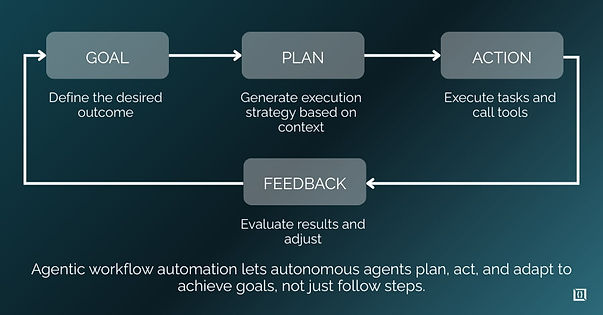
The key distinction is goal-driven execution. You define what outcome you want. The system determines how to achieve it, selects appropriate tools, executes actions, evaluates results, and adjusts its approach based on feedback.
What Makes a Workflow "Agentic"?
A workflow qualifies as agentic when it includes these minimum capabilities:
- Goal interpretation: Translates high-level objectives into actionable steps
- Planning: Creates execution strategies based on available resources and constraints
- Tool access: Selects and invokes external systems, APIs, or data sources
- Outcome evaluation: Assesses whether actions achieved intended results
- Re-planning: Adjusts approach when initial plans fail or conditions change
If your workflow lacks any of these, you're likely running enhanced automation rather than an agentic system.
Agentic Workflow Automation vs Rule-Based Automation
Rule-based automation follows predetermined paths. When input matches condition A, execute action B. This works for stable, well-defined processes but fails in dynamic environments.
Consider invoice processing. Rule-based systems handle standard invoices well but struggle when vendors submit non-standard formats, missing fields, or require cross-referencing with contracts. Each edge case requires new rules, creating maintenance overhead.
An agentic approach handles the same task differently. The agent receives the goal (process this invoice), examines the document, identifies missing information, queries relevant systems, makes judgment calls on ambiguous data, and routes exceptions appropriately. It adapts to variations without requiring explicit rules for each scenario.
Agentic Workflow Automation vs AI Workflow Automation
Many teams conflate "AI-powered" with "agentic." They're not the same.
Where AI Workflow Automation Falls Short
Standard AI workflows typically use LLMs for specific tasks within predetermined flows. You might use AI to summarize documents, classify tickets, or generate responses. But the workflow structure remains fixed. The AI handles discrete tasks; humans or rules handle orchestration.
These systems don't re-plan when things go wrong. If a classification step fails, the workflow either stops or follows a hardcoded fallback. There's no autonomous decision-making about what to try next.
Decision-Making vs Task Execution
The distinction matters operationally. AI task execution generates outputs. Agentic decision-making chooses what to do, when, and how.
A customer service example: AI-powered automation might classify an incoming ticket and route it based on that classification. Agentic automation would analyze the ticket, determine what information is needed to resolve it, query relevant systems, attempt resolution, evaluate whether the response addresses the customer's actual problem, and escalate with context if it can't resolve the issue.
When You Need Agentic Capabilities (and When You Don't)
Use agentic workflows when:
- Processes have high variability in inputs or required actions
- Edge cases are common and expensive to handle manually
- Goals are clearer than procedures
- Outcomes matter more than following specific steps
Avoid agentic workflows when:
- Processes are highly regulated with mandated procedures
- Deterministic outcomes are required for compliance
- The problem is well-defined with limited variation
- Your team lacks observability infrastructure to monitor agent behavior
Core Components of an Agentic Workflow System
An agentic workflow system is built from modular components that handle reasoning, planning, execution, state management, and feedback. Each component plays a specific role, and their interaction enables workflows to adapt, recover from failures, and make decisions within defined goals and constraints.
Component | Purpose | Key Points |
AI Agents | Make decisions and act | Clear scope, defined role |
Goals & Constraints | Define success and limits | Measurable, bounded |
Planning & Re-Planning | Create and adjust plans | Handle failures, adapt |
Tool Invocation | Execute APIs/services | Reliable, cost-aware |
Memory & Context | Track short- & long-term state | Avoid stale data |
Feedback & Self-Correction | Evaluate and recover | Signals, fallback |
1. AI Agents and Autonomous Decision Units
Agents are software components that receive inputs, reason about them, and produce outputs or actions. In agentic workflows, agents handle specific responsibilities: one might manage data retrieval, another handles analysis, another executes actions.
Each agent needs clear boundaries on what it can access and modify. Without constraints, agents make unpredictable decisions that create debugging nightmares.
2. Goal Definition and Constraint Modeling
Goals must be explicit and measurable. "Handle customer complaints" is too vague. "Resolve customer issues within SLA, minimize escalations, maintain satisfaction scores above threshold" provides actionable targets.
Constraints define boundaries: cost limits, time budgets, permission scopes, data access restrictions. Well-designed constraints prevent agents from taking harmful actions while pursuing goals.
3. Planning and Re-Planning Logic
Initial plans are hypotheses, not guarantees. Agents create execution strategies based on available information, but conditions change. APIs fail, data is missing, intermediate steps produce unexpected results.
Re-planning triggers include: action failures, timeout violations, constraint breaches, and evaluation scores below thresholds. The ability to detect these conditions and adjust plans distinguishes agentic systems from static automation.
4. Tool Invocation and Action Execution
Agents need access to tools: APIs, databases, external services. Tool selection involves trade-offs between reliability, cost, and latency. Agents must choose which tools to use, in what order, and how to handle failures.
Common risks include tool spam (excessive API calls), incorrect parameter inference, and cascading failures when dependent services are unavailable.
5. Memory, State, and Context Management
Agentic workflows require state management across steps. Short-term context tracks the current execution. Long-term memory stores patterns, preferences, and outcomes for future reference.
Memory leakage is a real risk. Agents that accumulate irrelevant context make increasingly poor decisions. Implement clear memory boundaries and cleanup mechanisms.
6. Feedback Loops and Self-Correction
Agents need signals about outcome quality. These come from explicit evaluations (did the customer confirm resolution?), implicit signals (did they contact support again?), or automated quality checks.
Self-correction means detecting failures and attempting recovery without human intervention. This requires clear success criteria and fallback strategies.
How Agentic Workflow Automation Works (End-to-End)
Agentic workflow automation executes goals in a loop: interpret objectives, plan actions, select tools, carry out tasks, evaluate outcomes, and adjust when needed. This stepwise process ensures workflows remain adaptive and resilient in real-world conditions.
Step 1: Interpreting Goals Instead of Instructions
The workflow begins with goal interpretation. Instead of receiving step-by-step instructions, the agent receives an objective: "Ensure this customer's billing issue is resolved."
The agent must convert this into actionable sub-goals: identify the specific issue, gather relevant account data, determine resolution options, execute the appropriate fix, confirm with the customer.
Step 2: Creating an Initial Execution Plan
Based on the goal and available context, the agent creates an execution plan. This plan is context-dependent and treated as a hypothesis. For a billing issue, the plan might be: query billing system, identify discrepancies, apply correction, send confirmation.
The plan adapts based on what the agent discovers. If the billing system shows no discrepancy, the plan shifts to investigating other potential causes.
Step 3: Selecting Tools and Data Sources
The agent selects which systems to query and in what order. Selection criteria include reliability, latency, data freshness, and cost. Fallback strategies handle cases where primary tools are unavailable.
For production systems, tool selection significantly impacts performance. An agent that queries five systems sequentially when one would suffice adds unnecessary latency and cost.
Step 4: Executing Actions and Evaluating Outcomes
The agent executes planned actions and evaluates results against success criteria. Clear success/failure signals are essential. Ambiguous outcomes lead to unpredictable behavior.
Logging at this stage is mandatory. You need complete records of what actions were taken, what inputs were provided, and what outputs were received.
Step 5: Re-Planning When Things Go Wrong
When actions fail or produce unexpected results, the agent must decide: retry, try alternative approaches, or escalate. This decision logic is central to agentic capability.
Retry logic needs limits. Agents that retry indefinitely waste resources. Escalation paths need clear triggers. The goal is controlled failure, not perfection.
Architecture Patterns for Agentic Workflow Automation
Agentic workflows can be structured in different patterns, each trading off complexity, scalability, and control. The appropriate architecture depends on workflow size, coordination needs, and context management requirements.
Single-Agent vs Multi-Agent Architectures
Single-agent systems are simpler to build and debug. One agent handles the entire workflow. This works for straightforward processes but struggles with complexity.
Multi-agent systems distribute responsibilities across specialized agents. An orchestrator coordinates task routing, information sharing, and conflict resolution. According to Deloitte, most enterprises are still experimenting with multi-agent coordination.
Trade-off: simplicity vs capability. Start simple and add agents only when single-agent performance bottlenecks are clear.
Centralized Orchestration vs Distributed Agents
Centralized orchestration maintains control but creates bottlenecks. The orchestrator becomes a single point of failure and a debugging focal point.
Distributed agents operate more autonomously but are harder to monitor and coordinate. Debugging distributed agent behavior requires sophisticated observability infrastructure.
Stateless vs Stateful Agentic Systems
Stateless systems are simpler to scale but lose context between invocations. Each request starts fresh.
Stateful systems maintain context across interactions, enabling more sophisticated workflows but adding complexity. State management, persistence, and cleanup become operational concerns.
Real-World Use Cases
Agentic workflows let you handle complex tasks more smoothly, coordinating actions, managing exceptions, and keeping context across systems.
- Customer Support Triage: Agents analyze incoming tickets, gather relevant context from multiple systems, attempt automated resolution, and route complex issues with full context to appropriate specialists.
- Document Processing: Agents extract information from varied document formats, cross-reference with existing records, flag inconsistencies, and route exceptions based on confidence levels.
- Incident Response: Agents detect anomalies, gather diagnostic information, execute remediation playbooks, and escalate with context when automated resolution fails.
Implementation Challenges and Considerations
Agentic workflow projects can run into trouble if cost, complexity, or risk aren’t carefully managed. Some common challenges are:
- Cost management: Token costs, compute costs, and orchestration overhead accumulate quickly at scale.
- Debugging complexity: Tracing agent decisions through multi-step workflows requires specialized tooling.
- Reliability: Non-deterministic behavior makes testing and validation difficult.
- Integration: Legacy systems often lack the APIs agents need to operate effectively.
Security, Governance, and Control
Security is fundamental, not something to skip. Implement least-privilege access for all tool calls, and scope permissions tightly. Log every agent action to maintain a clear audit trail.
Human-in-the-loop checkpoints act as safety nets for high-stakes decisions. Define clear escalation paths and rollback mechanisms for reversible actions.
Compliance readiness means decisions must be explainable. Agents should produce traceable logs showing why each action was taken.
When Agentic Workflow Automation Is the Wrong Choice
Agentic systems add complexity, so they’re worth using only when the problem truly requires it.
Don't use agentic workflows for:
- Processes with regulatory requirements for deterministic execution
- Simple, stable workflows that rule-based automation handles well
- Teams without observability and debugging capabilities
- Organizations that haven't validated the business case
Getting Started
Agentic workflow automation represents a shift from executing predetermined steps to pursuing defined goals. The technology enables workflows that adapt to variation, recover from failures, and improve over time.
But implementation requires clear-eyed assessment of costs, risks, and organizational readiness. Start with well-scoped use cases where agentic capabilities provide measurable value. Build observability infrastructure before scaling. Treat agents as systems that require governance, not magic solutions that handle themselves.
The organizations succeeding with agentic workflows are those that match the technology to genuine operational needs rather than adopting it because it's novel.
You can also connect with our experts to evaluate your workflows, identify where agentic automation adds value, and design a practical implementation roadmap.
Frequently Asked Questions
What tools support agentic workflow automation?
Agent frameworks (LangGraph, AutoGen, CrewAI) handle agent definition and orchestration. Workflow orchestration platforms (Temporal, Conductor) provide execution infrastructure. Observability tools (Langfuse, LangSmith) enable debugging and monitoring. The tool must support goal-driven execution, not just task automation.
How much does agentic workflow automation cost?
Costs include LLM tokens, compute for orchestration, observability infrastructure, and engineering time. POC costs are modest. Production costs scale with volume and complexity. Organizations report 70% cost reductions in targeted processes, but achieving that requires optimization work.
What happens when an agent makes the wrong decision?
Implement retry logic for recoverable failures, rollback mechanisms for reversible actions, and escalation paths for human review. Design for controlled failure. No agent system achieves perfection.
How do you debug agentic workflows?
Trace at the decision level, not just actions. Log inputs, reasoning steps, tool calls, and outcomes. Implement replayability so you can reproduce failures. Observability is mandatory, not optional.
Do agentic workflows replace human operators?
They augment rather than replace. Humans handle exceptions, provide oversight, and make high-stakes decisions. The goal is shifting human effort from routine execution to supervision and improvement.