How to Write a PRD: Product Requirements Document Guide, Template and Example (2026)

Writing a Product Requirements Document (PRD) is an important part of the product development process. A good PRD is a roadmap that aligns teams and stakeholders to a common goal.
Let's explore what a PRD is, why it matters, and how to create one effectively.
Download our free PRD template and use it as a guide to map out your product's vision, features, and goals
You will find the core PRD structure, a worked example with acceptance criteria and KPIs, and guidance on adapting the document for agile teams.
What is a Product Requirements Document (PRD)?
A Product Requirements Document (PRD) is a detailed document that outlines a product's functional and non-functional requirements. It serves as a blueprint, guiding the development team through the creation process by specifying what the product should do, its features, and the criteria for its success.
The PRD ensures that all stakeholders have a clear understanding of the product's objectives, scope, and deliverables, facilitating effective collaboration and minimizing misunderstandings.
Why Is a Product Requirements Document Important?
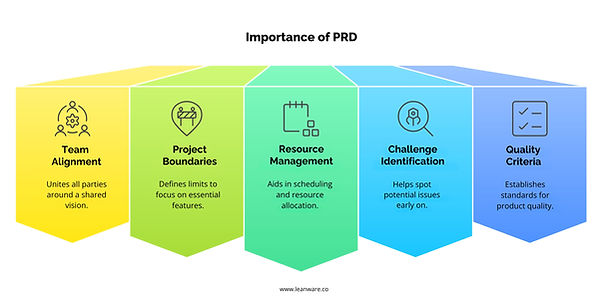
A Product Requirements Document (PRD) is crucial in product development for various reasons. Here are a few of them:
- Unites developers, designers, and stakeholders around a common vision and objectives.
- Defines project boundaries to prevent unnecessary feature additions and maintain focus on critical functionalities.
- Facilitates accurate scheduling and resource allocation for better project management.
- Identifies potential challenges early, allowing teams to develop proactive solutions.
- Establishes clear criteria to maintain product quality and meet user needs and business goals.
PRDs also help prevent critical technical challenges in software development, including architecture misalignment with product requirements, overlooked technical dependencies, and underestimated implementation complexity.
PRD vs. Other Product Documentation
A PRD is different from other documentation like BRDs and user stories. For example, here's how a PRD compares:
PRD vs. BRD (Business Requirements Document)
A Business Requirements Document (BRD) focuses on the business needs and goals. It addresses why the company is pursuing a specific project or product from a business perspective. It generally includes information like the market opportunity, competitive landscape, and financial considerations.
A PRD, on the other hand, focuses on how the product will meet those business needs. It outlines what the specific product features will be, how they'll work, and who will use them. Essentially, the BRD is about the "why," and the PRD is about the "what."
PRD vs. User Stories
User stories are concise descriptions of a product feature from the user's perspective, usually in the format: "As a [user type], I want to [action] so that [benefit]." They are often used within agile methodologies and focus on specific, granular aspects of a product.
They're derived from the PRD, which lays out the larger vision and product goals. The PRD provides the overall context and direction, while user stories detail specific interactions and features. You can think of the PRD as the full architectural blueprint, and user stories as individual room plans inside.
When to Use PRDs vs. Wireframes
Wireframes are visual representations of a product's layout and functionality. They illustrate the structure and content of an interface without going into design details.
Wireframes help teams visualize user flows and interactions, making it easier to discuss and refine the user experience. PRDs, on the other hand, are text-based documents that provide context, requirements, and goals.
Wireframes are often used alongside PRDs to bring those requirements to life. You would generally create a PRD first to define the product requirements and then use wireframes to explore visual solutions based on those requirements.
PRDs in Agile vs. Waterfall Frameworks
The shape a PRD takes depends on how your team works. A traditional (waterfall) project and an agile project make different demands on the document, and adapting the PRD to the methodology keeps it useful instead of ceremonial.
Traditional (Waterfall) vs. Agile PRDs
Aspect | Traditional (Waterfall) PRD | Agile PRD |
|---|---|---|
Formality | Highly formal, comprehensive, static | Less formal, concise, flexible |
Level of Detail | Exhaustive up-front specifications; includes full requirements, design specs, success criteria, and documentation | Focuses on MVP and prioritized features; evolves alongside project iterations |
Change Management | Changes are difficult and costly, requiring formal revision control | Embraces change; requirements are updated frequently based on team and stakeholder feedback |
Purpose | Acts as a rigid contract between stakeholders and delivery teams | Serves as a living document shared by cross-functional teams |
Content Examples | Fixed feature lists, technical requirements, Gantt-style schedules, strict acceptance criteria | User stories, personas, acceptance criteria, backlogs, and goals for each sprint |
When to Use Each Approach
A traditional (waterfall) PRD fits best when requirements, technology, and outcomes are stable and clear from the outset. It suits large, resource-heavy projects that need strict compliance or extensive documentation (regulated industries, for example), large multidisciplinary teams that need explicit role definitions and approvals, and fixed delivery deadlines that leave little room for iteration.
An agile PRD is the better choice when requirements are likely to evolve or are not fully defined at the start. It works well for projects that benefit from continuous customer feedback and iterative delivery, for small to medium cross-functional teams, and for flexible timelines where the team works in short sprints focused on rapid learning and delivery.
Many organizations blend both: a formal PRD carries the overall vision and compliance requirements, paired with lightweight, evolving documentation during agile sprints for implementation.
Components to Include in an Effective PRD

A well-structured PRD includes several key components that, when combined, ensure a clear and comprehensive understanding of the product. For instance:
1. Purpose of the Product
This section outlines the core objectives of the product, the problem it's designed to solve, and the value it will deliver to the target audience. It should articulate the business need and user pain point that the product addresses. Here, you clarify why you're building this product, avoiding any ambiguity.
Is it optional? No, it's essential for guiding all subsequent sections and decisions.
Example: A fitness app's purpose might be to help users track their workouts, monitor progress, and stay motivated through personalized recommendations.
2. Key Features and Requirements
Here, you detail the essential features, functionality, and technical specifications necessary for the product's success. This includes not just what the product will do but also how it should perform. You need to be clear about which features are mandatory for the initial release and which are planned for future iterations.
Is it optional? No, it's a core component that defines the product's capabilities.
Example: For the fitness app, key features might include a workout tracker, progress dashboard, and integration with wearable devices.
3. User Profiles and Goals
This part describes the target users, their needs, and how the product will specifically address their goals. You'll define user personas to clearly articulate the characteristics of your target audience, going beyond demographics to include their pain points, motivations, and context of use.
Is it optional? No, it is crucial for creating a user-centered product.
For example, a fitness app might target busy professionals who want to stay fit but have limited time for exercise.
4. Release Criteria and Timeline
In this section, you set measurable criteria for determining when the product is ready to launch. It includes quality standards, feature completeness, and performance benchmarks. You'll also establish a realistic timeline with key milestones to manage expectations and keep the project on track.
Is it optional? No, it is necessary for effective project management and accountability.
Example: The app must support 10,000 concurrent users and have a crash rate of less than 0.1% before launch.
5. Risk Assessment and Mitigation Plan
Identifying potential challenges early allows the team to plan for them and reduces their impact. This part is about anticipating and preparing for the unexpected.
Is it optional? While not mandatory for every project, it is highly recommended for projects with uncertainty.
For Example, a potential risk for an e-commerce app might be payment gateway failures, with a mitigation plan to integrate a backup gateway.
6. Success Metrics
These metrics help you determine whether the product is achieving its intended goals. It's essential to have measurable ways to evaluate your success, and this also provides valuable data for future development iterations.
Is it optional? No. You need to be able to measure the impact of the product.
Example: "Success metrics include: monthly active users, customer satisfaction scores (NPS), average order value, and customer acquisition cost. We will track these metrics to continuously improve the product."
7. Collaboration with Stakeholders
A PRD is not created in isolation. It's essential to engage relevant stakeholders, such as designers, developers, product managers, and even marketing, to review, provide feedback, and refine the document collaboratively. This ensures that the PRD reflects the needs and constraints of all involved parties.
PRD example: what the document looks like filled in
The components above are easier to apply when you can see them in a real document. Here is a condensed example for a fictional product, SnapCart, showing how the opening sections, the feature list, and the success metrics read once they are filled in.
Product Name: SnapCart
Product Type: Mobile Application
Target Audience: Small business owners and local retailers
Purpose: SnapCart is a mobile app that allows local retailers to quickly digitize their physical inventory using image recognition and barcode scanning. The goal is to streamline stock management for small businesses that lack complex POS systems.
Problem Statement: Small retailers often struggle with manual inventory tracking, which leads to stockouts, overstocking, and inaccurate reporting.
Solution Summary: SnapCart enables users to scan products using their smartphone, automatically categorizes them, and syncs with a simple dashboard for inventory and reorder management.
Example: Feature List with Acceptance Criteria
Use the format below to document product features clearly, making each one testable and verifiable.
Feature | User Story | Acceptance Criteria |
|---|---|---|
Create Task | As a user, I want to create new tasks so I can track my work items | Given I'm on the dashboard, when I click "Add Task" and enter a title, the task appears in the default column with a timestamp. |
Drag and Drop Tasks | As a user, I want to move tasks between columns to show progress | Given that I have tasks in multiple columns, when I drag a task to another column, it moves visually and saves the new position. |
Assign Tasks to Users | As a team lead, I want to assign tasks so that everyone knows their responsibilities. | Given I edit a task, when I select a team member, they receive a notification and appear as the assignee on the task card. |
Real-time Sync | As a user, I want to see updates instantly when teammates make changes. | Given a teammate updates a task, when I am viewing the board, the changes appear without needing to refresh. |
Example: KPIs & Success Metrics
Align your product goals with measurable outcomes. This helps in tracking the product's real-world performance.
Product Goal | KPI | Success Metric |
|---|---|---|
Increase product usage | Monthly Active Users (MAU) | Reach 10,000 MAUs within 3 months post-launch |
Improve team collaboration | Tasks Shared per User | Average of 5+ tasks shared per user per week |
Reduce churn rate | Retention Rate (30-day) | 70% of users remain active after 30 days |
Enhance customer satisfaction | NPS Score | Maintain a Net Promoter Score of 40+ |
Drive team adoption | Team Creation Rate | 50% of new users create or join a team in the first 7 days |
Best Practices for Writing a PRD
Keep it clear and concise
Overly technical terms and long explanations create confusion rather than clarity. Use simple, direct language, organize the document with clear headings, and prioritize the information the team actually needs to build. A concise PRD keeps teams aligned and speeds up decisions.
Align business and technical teams
A PRD works when it reflects both strategic intent and technical reality. Work with engineers early to test feasibility, involve sales and marketing so market positioning and customer needs are represented, and keep feedback channels open while the document takes shape.
Use visuals where text falls short
Diagrams, wireframes, and flowcharts communicate workflows, user journeys, and feature dependencies faster than paragraphs can. Adding them to the PRD reduces miscommunication during development.
Maintain flexibility for iterations
Requirements evolve with user feedback and market shifts, and the PRD should too. Keep the structure modular so sections can change without disrupting the whole, and revisit the document regularly as new insights arrive.
Conclusion
Building great products starts with a solid PRD. By defining the purpose, features, and user needs as discussed, you create a document that guides your team from concept to launch. A clear PRD is your best tool for success, so invest the time to make it count.
If you want a faster starting point, try Leanware's PRD Agent, a tool that helps you draft a complete Product Requirements Document from your product idea.
If you need personalized guidance on creating an effective PRD, consider reaching out for a free consultation to ensure your document sets your product up for success.
Frequently Asked Questions
Is there a tool for building PRDs?
Yes. Leanware's PRD Agent is designed to simplify the creation of Product Requirements Documents. It helps you produce a thorough, well-organized PRD from your product idea, allowing you to focus on what matters: developing a successful product.
What Does a PRD Look Like?
A PRD typically includes sections such as the product's purpose, target audience, key features, user profiles, release criteria, timeline, and success metrics. It may also contain diagrams, wireframes, and detailed descriptions of each feature and requirement to provide a clear and comprehensive guide for the development team.
When Should You Use a PRD?
A PRD should be used at the beginning of the product development process, after initial market research, and before the design and development phases. It serves as a reference point throughout the project, ensuring that all team members are aligned and that the product development stays on track.
Can PRDs Be Used in Agile Methodologies?
Absolutely. While Agile focuses on flexibility and iteration, a PRD can still be very useful. In Agile, the PRD can grow along with the product through each iteration. It provides the initial foundation for sprints and can be updated as the product is developed. The PRD serves as a living document that guides development while allowing for Agile flexibility and changes.
What is the structure of a PRD?
A typical PRD is structured around six parts: an overview of the product, its goals, the scope of the work, the features to be built, the timeline, and the known risks.
How many pages should a PRD have?
There isn't a strict page count, but PRDs typically range from 2 to 10 pages. The focus should be on clarity and concise content rather than length, so the document effectively guides development and is easily understood by all stakeholders.
What should be included in a PRD?
A PRD should clearly define the product's purpose, key features with use cases, and release criteria (functionality, usability, reliability, performance), as well as the assumptions, constraints, and dependencies that guide development.