


.webp)


AI Agent Workflow Automation Software Development: When to Graduate From No Code Platforms to a Custom Build
- Leanware Editorial Team

- 12 hours ago
- 15 min read
Every automation stack reaches a breaking point. A Zap that connected three apps worked fine, until the workflow needed conditional logic, cross system memory, and exception handling that matched actual business rules. Then the volume doubled, the error rate climbed alongside it, and nobody could debug the chain of workarounds holding it together.
The platform worked. Then the workflow outgrew it. The decision now is whether to patch it again, switch to another platform with the same architectural constraints, or invest in proper ai agent workflow automation software development, something engineered for the actual complexity.
This article covers where automation platforms work well, where their limitations become costly, what the signals look like when you've hit the ceiling, and how to evaluate a custom agent partner when you get there.
Two Tiers of Automation Tools
The automation market split into two tiers over the past three years, and most teams evaluating their options are comparing tools from both without recognizing that they solve fundamentally different problems.
The first tier is self serve platforms built for speed: Zapier, Make, n8n. They connect SaaS applications through trigger action logic, require no engineering team, and get a working automation running in minutes. They optimize for breadth of integrations and ease of setup.
The second tier is AI native tools built for autonomy: Lindy, Zapier Agents, and similar products that use language models to interpret inputs, make decisions, and take multi step actions. They promise adaptive behavior that goes beyond rigid if then logic.
Both tiers serve real needs. The divide is in what happens when workflow complexity exceeds what either tier was designed to handle, and when that gap appears, teams start looking at custom ai agent workflow automation software development as the path forward.
What AI native automation tools actually promise
Tools like Lindy and Zapier Agents layer language model capabilities on top of automation infrastructure. An agent can read an email, interpret the request, look up relevant data, draft a response, and send it. The marketing promise is that these tools handle ambiguity and adapt to variable inputs without manual configuration.
In reality, the capabilities are real for bounded use cases. The limitations surface when the workflow requires persistent memory across sessions, deep integration with systems outside the platform's connector catalog, custom error handling that matches a specific business process, or auditability and logging that satisfies compliance requirements.
What No Code Automation Tools Actually Do Well
Credit where it belongs. Platforms dominate the first stage of automation adoption because they deliver real value under specific conditions.
Speed to First Automation
A non technical operator can build a working Zap or Make scenario in under an hour. The visual builder, pre built triggers, and template library eliminate the need for engineering involvement at the start. For a team testing whether a workflow should be automated at all, this speed is the primary value.
Ecosystem and Integration Coverage
Zapier connects to over 7,000 applications. Make and n8n cover thousands more. For a company running a standard SaaS stack (HubSpot, Slack, Google Workspace, Stripe, Shopify), the connector coverage handles most integration needs without custom API work.
Cost Efficiency at Low Volume
Zapier's Professional plan starts at $19.99 per month billed annually, or $29.99 per month billed monthly, for 750 tasks. At low volume, the per task cost is negligible compared to the labor cost of doing the work manually. Platforms are the right financial choice when task volume is low and the workflow is simple. This is a legitimate reason to stay on a platform, and recognizing it is part of an honest evaluation.
Note: Zapier pricing changes frequently. Check zapier.com/pricing for current rates before running any cost comparison.
Community, Templates, and Self Service Support
Active communities, pre built templates, and extensive documentation mean operators can troubleshoot and iterate without filing support tickets or hiring consultants. This self service ecosystem is a genuine advantage that custom solutions do not replicate.
Where Self Serve Platforms Start to Break Down
Six months in, the same teams that praised the speed of setup start spending more time maintaining automations than the automations save. The failure modes show up in predictable ways.
The Limits of Trigger Action Logic in Complex Workflows
Trigger action architecture runs a linear sequence: event happens, actions fire in order. When a workflow requires branching based on multiple conditions, looping through a dataset, or making a decision that depends on data from three different systems evaluated together, the platform forces workarounds. Paths and filters help, but they produce complex visual flows that are difficult to debug, impossible to test systematically, and fragile when any connected system changes its API.
A freight broker routing inbound rate requests needs to check carrier availability, compare against lane history, evaluate margin targets, and respond differently based on the combination of all three. That decision tree requires reasoning across multiple data points simultaneously. A trigger action chain evaluates them sequentially and loses context between steps.
What Happens When a Workflow Hits an Exception
Platform automations handle exceptions poorly. The common pattern: a step fails, the Zap pauses, an error notification goes to an email inbox that nobody monitors, and the failed task sits in a queue until someone manually investigates. There is no contextual escalation, no business rule driven routing, and no feedback mechanism that prevents the same failure from recurring.
A custom agent handles the same exception differently. It detects the failure, evaluates the context (what type of transaction, what customer tier, what dollar amount), routes the escalation to the appropriate person with the full context attached, and logs the decision for review. The failure becomes a managed event rather than a silent breakdown.
Hallucination risk in AI features
When platforms add LLM powered steps (AI generated responses, content classification, data extraction), the language model operates without the grounding controls that production AI systems require. The model may generate plausible but incorrect outputs, misclassify a document, or extract the wrong data from an invoice. In low stakes workflows like drafting social media posts, this is acceptable. In workflows that involve financial data, customer communications, or compliance documentation, ungrounded AI outputs create real business risk.
The best case path for AI features in no code platforms is using them for tasks where the output is reviewed before action is taken, treating the AI step as a draft rather than a decision.
Why Volume and Frequency Change the Economics
Platform pricing scales with task volume. The math that makes a platform the right choice at a few hundred tasks per month changes as volume climbs into the thousands. To get an honest picture of your true automation cost, add up the platform subscription, the hours your team spends maintaining automations each month, and the hours spent recovering from failures. Use your own burdened hourly rate for the labor components. That total is the number to compare against the cost of a managed custom agent, not the platform subscription line in isolation.
Check the current pricing page for your platform of choice when running this calculation, as rates change and task based billing often produces surprises at scale.
Data Privacy and Compliance Gaps in SaaS Platforms
Workflows that process protected health information (HIPAA), personal data of EU residents (GDPR), or financial data subject to audit requirements (SOC 2) face compliance constraints on third party SaaS platforms. Data flows through the platform provider's infrastructure, often through multiple sub processors, with logging and access controls that the customer cannot fully audit or configure. For regulated workflows, this infrastructure model may not satisfy compliance requirements regardless of the platform's stated certifications.
The Hidden Cost of Patching Automations Over Time
Automations accumulate technical debt. A workflow built twelve months ago has been patched six times, has three workaround steps that nobody fully understands, and runs on a logic chain that was never designed to handle the current volume or complexity. Ownership is unclear. Documentation does not exist. The person who built it may no longer be at the company. Each patch increases fragility and maintenance burden. This pattern is invisible in monthly platform costs but real in operational risk and labor hours.
What a Custom AI Agent Actually Is
Three terms get used interchangeably in vendor conversations, and the confusion costs teams time during evaluation.
The Difference Between a Bot, a Workflow, and an Agent
A bot follows a script. It responds to specific inputs with predefined outputs. A support chatbot that matches keywords to FAQ answers is a bot.
A workflow runs a sequence of steps triggered by an event. A Zap that creates a CRM record when a form is submitted is a workflow.
An agent reasons about goals, selects tools, executes multi step actions, evaluates results, and adjusts its approach based on what it finds. An agent that receives a vendor invoice, extracts the data, checks it against a purchase order, routes exceptions based on business rules, and posts to the ERP is operating at a fundamentally different level than a bot or a workflow.
What Managed Means and Why It Matters
A managed agent runs on infrastructure that the development partner owns and monitors. The partner handles hosting, model API costs, performance monitoring, prompt refinement, and continuous improvement. The client receives one invoice with no separate charges for cloud, compute, or API usage.
This model matters because AI agents are not static software. They operate on language models that receive updates, APIs that change behavior, and data patterns that shift over time. An agent that works correctly at launch can degrade within weeks without ongoing monitoring and refinement. Managed delivery treats the agent as a living system rather than a finished product.
How Custom Agents Integrate With Proprietary and Legacy Systems
Companies whose core systems are not in Zapier's connector catalog (custom ERPs, industry specific platforms, legacy databases, internal tools) cannot automate those workflows on a platform.
Custom agents are built around the actual stack: direct API integration, database connectors, and adapter layers for systems that predate modern API standards. The agent operates within the company's real infrastructure rather than within a platform's connector catalog.
Memory, Context, and Continuity Across Sessions
Platform automations are stateless. Each execution starts fresh with no memory of previous runs. A custom agent maintains persistent memory across sessions. A vendor bill received on Tuesday is still in context when the matching purchase order arrives on Friday.
A customer interaction from last week informs how the agent handles the same customer this week. This continuity is what enables agents to handle workflows that unfold over hours or days rather than executing in a single pass.
How Custom Agents Handle What Platforms Cannot
Platform constraints are architectural. No amount of configuration changes what the underlying system was designed to do. Custom agents operate on a different architecture entirely.
Multi Agent Orchestration for Complex Business Processes
Complex workflows benefit from multiple specialized agents coordinating through an orchestration layer. An intake agent classifies and extracts data from incoming documents. A processing agent validates the data against business rules and routes exceptions.
An escalation agent notifies the right person with full context when human judgment is required. Each agent specializes in one phase, and the orchestration layer manages the handoffs, error handling, and data flow between them.
Human in the Loop Design and When Agents Should Escalate
Good agent design knows its limits. Confidence thresholds determine when the agent acts autonomously and when it routes to a human reviewer. Approval gates require human sign off for actions above defined dollar amounts or risk levels. The escalation carries full context: what the agent found, what it recommends, and why it is uncertain. This is an architectural feature, not a limitation.
Auditability, Logging, and Explainability
Every agent action, tool call, decision, and data access is logged with timestamps and the data that drove the decision. This audit trail satisfies compliance requirements in regulated industries (HIPAA, SOC 2, GDPR) and provides the transparency that platform based automations, with their limited logging capabilities, cannot match. When a regulator or auditor asks why a specific action was taken, the log provides the answer.
Continuous Improvement Through Monitoring and Retraining
A managed agent evolves over time. The monitoring team captures edge cases, identifies accuracy drops, refines prompts, and adjusts decision logic based on production data. Performance reviews happen on a regular cadence, and improvements compound as the agent accumulates experience with the company's specific data patterns and exception types.
This is fundamentally different from a set and forget automation that runs the same logic indefinitely.
The Signals That Tell You It Is Time to Graduate
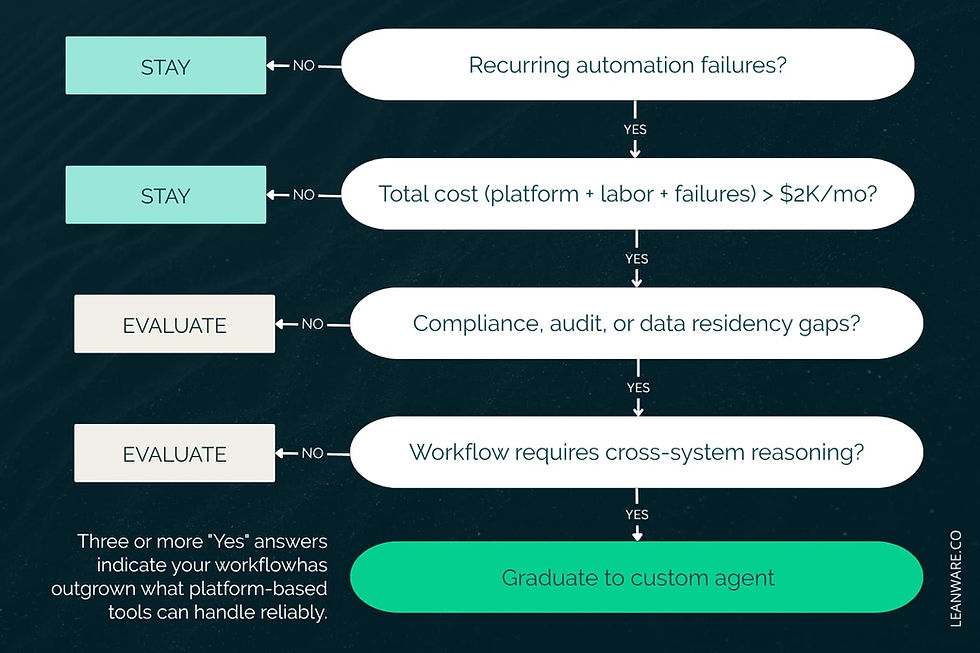
Three or more of the following signals in your current operations mean the platform ceiling is costing you money, not just convenience.
Operational Signals
Automations fail on a recurring basis and the root cause is workflow complexity, not a temporary API issue. Manual overrides are a regular part of the process because the automation cannot handle exceptions. An unmonitored exception queue grows steadily. The team works around the automation rather than through it.
Financial Signals
Run the total cost calculation described above: platform subscription, plus the labor hours your team spends each month maintaining automations and recovering from failures, priced at your actual burdened hourly rate. When that total approaches or exceeds the monthly cost of a managed custom agent that handles the same volume with higher reliability, the economics have shifted. The crossover point is different for every team depending on volume, wage rates, and error frequency, so calculate it from your own numbers rather than from a benchmark.
Strategic Signals
Compliance requirements are tightening and the platform cannot provide the logging, access controls, or data handling guarantees that auditors expect. Competitors are automating the same workflows with higher reliability and faster turnaround. Growth is breaking per task pricing models, and the monthly bill is climbing without proportional value.
Team and Ownership Signals
Nobody owns the automation stack. The person who built the core workflows has left the company. Nobody can audit what runs, what data flows where, or what happens when a step fails. Institutional knowledge about the automations lives in one person's head rather than in documentation. These signals carry equal weight to financial signals because they represent operational risk that compounds over time.
When You Should NOT Graduate Yet
Not every team running into limitations on a platform needs custom development. These conditions mean staying on the platform is the better decision.
You Are Still Validating the Workflow
If you are still testing whether a workflow should be automated at all, platforms are the right testing ground. They let you validate the workflow quickly, identify bottlenecks, and measure whether automation creates value before committing to a custom build. Graduate after the workflow is proven and the automation requirements exceed what the platform can handle.
Your Workflows Are Linear and Stable
If your automations follow a predictable trigger action sequence, process a consistent input format, and rarely generate exceptions, the platform handles your requirements well. A Zap that creates a CRM record from a form submission and sends a Slack notification is a workflow that does not need custom engineering. Recognize when the tool fits and stay on it.
Your Volume Does Not Justify the Investment Yet
Custom agent engagements involve setup fees and monthly managed service costs. If your total automation cost (platform plus maintenance plus failure recovery) is comfortably below $1,500 per month, the ROI math for a custom agent likely does not work yet. Monitor the trajectory. When volume growth pushes total costs past that range and reliability issues increase alongside it, revisit the decision.
How to Evaluate a Custom AI Agent Partner
Choosing a partner for ai agent workflow automation software development requires different criteria than selecting a SaaS tool. The questions below apply to any vendor you are considering. They are designed to surface accountability gaps, hidden costs, and delivery risk before you sign anything.
Questions to Ask Before Signing a Contract
Before committing to a build, you need clarity on how the system will be owned, operated, and improved after deployment.
Who owns the agent infrastructure, and what happens if the relationship ends?
What is the monitoring commitment after deployment, and how is performance tracked?
What are the SLAs for uptime and issue resolution?
When the agent makes an error in production, what is the accountability and resolution process?
How does the agent improve over time, and what does the refinement cadence look like?
What is the minimum engagement period, and what does the fee include — is infrastructure bundled, or are cloud and API costs passed through separately?
Red Flags That Signal a Vendor Is Selling a Platform, Not a Solution
The vendor adds custom code to a no code platform and calls it custom development. There is no monitoring commitment beyond a 30 day warranty period. When asked how the agent handles a specific failure scenario, the answer is vague or refers to a generic retry mechanism. The proposal skips workflow mapping and jumps straight to technology selection.
What a Good Scoping Process Looks Like
A competent scoping process maps the current workflow end to end, identifies every decision point and exception type, defines the systems the agent will and will not touch, establishes success metrics before development begins, and produces a fixed scope statement of work with clear deliverables. This is industry best practice regardless of vendor.
What Onboarding and Handoff Should Look Like
Documentation that covers the agent's architecture, decision logic, integration points, and escalation paths. A testing phase where the agent runs on real data with human review of every output. A defined monitoring cadence (daily, weekly) with reporting on agent performance. Iteration cycles where edge cases captured in production are fed back into the agent's logic.
Understanding Pricing Models for Custom Agent Engagements
Pricing models vary significantly depending on how scope, ownership, and ongoing maintenance responsibilities are structured.
Project based pricing defines a fixed scope with a fixed cost. It works for well defined, bounded builds. The risk is scope expansion that generates change orders.
Retainer or managed service pricing provides ongoing development, monitoring, and refinement for a monthly fee. It works when the agent requires continuous improvement and the scope evolves over time. Ask what the fee includes: is infrastructure bundled, or are cloud and API costs passed through separately?
Outcome based pricing ties payment to measurable results. It is rare in practice because AI agent outcomes depend on data quality and workflow complexity that the vendor does not fully control. If offered, scrutinize the measurement methodology.
Measuring ROI on a Custom AI Agent
ROI is measured against a baseline, not projected from a vendor's slide deck. The measurement process starts before development.
Defining success metrics before you build
Set KPIs before the agent is built: error rate on the automated workflow, processing time per task, escalation frequency, cost per completed task, and total labor hours recovered. These metrics form the baseline that post deployment performance is measured against. Without a baseline, ROI claims are assertions rather than measurements.
How to build an internal business case
The structure is simple:
Current cost of the problem: Labor hours, error costs, platform fees, maintenance time
Estimated cost of the solution: Setup fee, monthly managed service
Projected savings timeline: Typically 3 to 6 months to reach positive ROI on a well scoped engagement
An AI ROI Assessment can populate the first column of this business case. It maps the current workflow, quantifies the cost, and projects the return, turning an internal conversation from "we think AI could help" into "here is what it costs us today and here is what we recover."
Your Next Step
Platforms are the right tool until they are not. The graduation decision is clear when you can see the signals: recurring failures, rising maintenance costs, compliance gaps, unclear ownership, and per task economics that no longer make sense at your current volume.
The AI ROI Assessment takes two weeks and produces a workflow analysis, tier recommendation, and ROI projection. Fifty percent of the Assessment fee is credited toward the agent setup fee if you move forward within 30 days. Taking the Assessment does not commit you to a build. It gives you the data to make a decision with clarity.
Book the AI ROI Assessment to get a clear breakdown of your current automation stack, where it starts failing operationally, and whether a custom agent is actually justified for your workflows.
Frequently Asked Questions
How do I justify the cost of a custom agent versus staying on Zapier or Make?
Run the total cost calculation: platform subscription plus the labor hours your team spends each month maintaining automations and recovering from failures, at your own burdened hourly rate, plus the cost of errors that reach customers. Compare that total against the monthly managed service cost for a custom agent. The crossover point is different for every team, so the calculation needs to use your own numbers. Check current platform pricing before running the comparison, as rates change frequently.
How quickly does a custom agent deliver measurable value?
Single workflow agents typically reach production in 3 to 5 weeks. Measurable performance improvements, tracked against the baseline established in the AI ROI Assessment, usually appear within 60 days of production deployment. Most engagements run on a six-month minimum term, long enough for the agent to be optimized against real production data before ROI is formally evaluated.
Who owns the agent if the vendor relationship ends?
Ask this question explicitly during evaluation. Responsible vendors provide full documentation of the agent's architecture, decision logic, integration points, and operational procedures. The client should retain access to all custom code, prompt configurations, and data. Vendors who cannot answer this question clearly are a risk.
Who is accountable when the agent makes an error?
In a managed service model, the vendor is accountable. The monitoring team detects the error, identifies the root cause, and applies the fix. Every agent action is logged, so the error can be traced to the specific input, decision, and data that produced it. For actions above defined dollar thresholds, human in the loop controls prevent the error from executing without approval.
How do I know if the timing is right for my team?
If your automations require more than 5 hours per month of maintenance, if you have recurring failures that cause operational disruption, if compliance requirements are tightening, or if your per-task costs are climbing faster than the value they deliver, the timing is right. If none of these apply, stay on your current platform and revisit in six months.
Why not just hire a developer to build this in house?
You can. The challenge is that production-grade ai agent workflow automation software development requires orchestration design, model evaluation, integration engineering, prompt architecture, and ongoing MLOps. That is not one developer, it is a team with specialized skills that takes months to assemble and longer to become productive. A managed service partner provides that team immediately and handles the ongoing maintenance that an in-house hire would need to manage alone. For most SMB and mid-market companies, the partner model delivers faster time to value at lower total cost than an internal build.


