.webp)


AI and Automation Services for Business Process: Why AP Automation Platforms Fail Professional Services Firms (And What Actually Fixes It)
- Leanware Editorial Team

- 12 hours ago
- 11 min read
Professional services firms run their back offices on a patchwork of email inboxes, OCR tools, spreadsheets, and ERPs that have been customized over years. Invoices arrive in dozens of formats. GL coding requires project allocation logic that lives outside the invoice. Approval routing changes by amount, department, and engagement type. The finance team knows every workaround because they built them.
Every AP automation platform these firms have tried covers the clean 30 to 40% of invoices that arrive in standard formats from known vendors. The remaining 60 to 70%, the invoices with format variability, non-PO matching requirements, and multi project GL splits, still land on someone's desk.
Custom agent engineering handles those workflows when the build is designed against the firm's actual data, actual ERP configuration, and actual approval logic.
Is This for You?
Before getting into how the engineering works, here is where custom agent engineering is and is not the right answer.
In scope: Mid market professional services firms processing 200 plus invoices monthly, running a customized ERP, with a manual back office burden growing faster than headcount can absorb. The operations or finance leader whose team spends more time on data entry than analysis.
Out of scope: If the firm processes fewer than 100 invoices per month on a standard, uncustomized ERP, a SaaS AP automation tool (Bill.com, Tipalti, Stampli) covers the requirements at lower cost. Custom agent engineering is justified when document variability, GL coding complexity, and ERP integration depth exceed what those platforms handle.
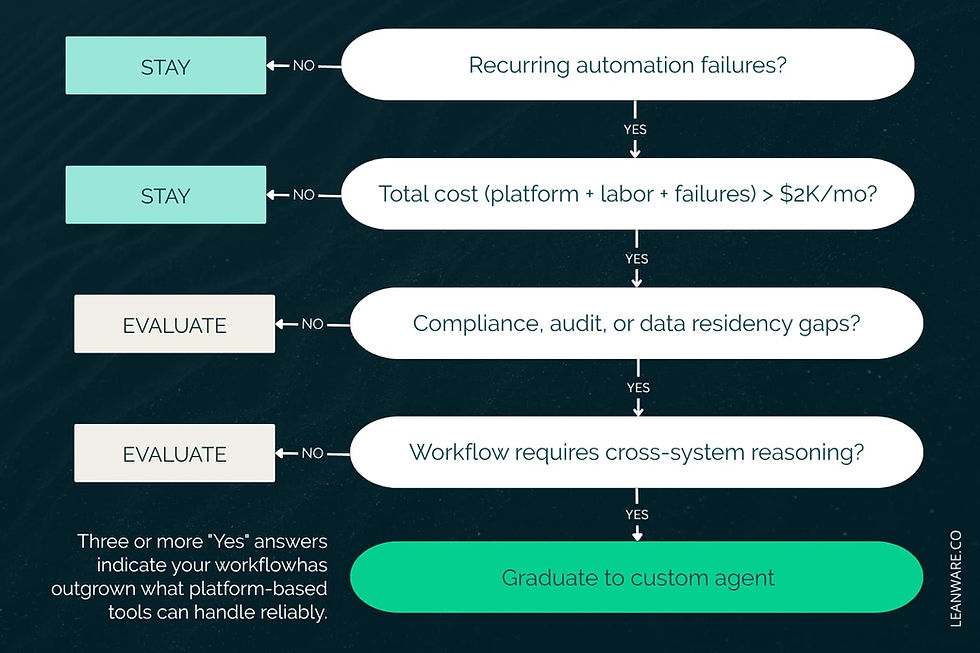
Five signals indicate a firm has outgrown platform level solutions:
Average processing time per invoice exceeds 10 days
Exception rates run above 18% of total volume
Touchless processing rate falls below 30%
Finance staff spend 40% or more of their time on AP intake and processing
Month end close is delayed by reconciliation and posting work that should have completed during the processing cycle
Three or more of these mean the manual status quo costs more than the engineering investment to fix it.
What "Back Office Automation" Actually Means for a Services Firm
AP automation in a professional services context means automating the back office processes that a small finance team runs every week: accounts payable, vendor onboarding, document intake, client billing, and expense categorization. These are document heavy, judgment heavy workflows that touch multiple systems and require decisions based on context that lives outside the document itself.
The finance team at a mid market services firm operates a multi system AP stack: invoices arrive via email, a vendor portal, and occasionally physical mail. They flow through an OCR tool (or manual data entry), into a spreadsheet for GL coding, through an approval chain that varies by amount and department, and into an ERP that has been customized enough that generic connectors post incorrectly.
Where the Engineering Case Is Clearest
Four processes share three characteristics that make them strong automation candidates: high document format variability, low purchase order coverage, and ERP write back complexity. These aren't the four "best ROI" processes in some universal ranking, they're the four where custom agent engineering solves problems that platforms cannot reach.
AP invoice processing consumes the most labor hours and generates the most exceptions. The volume compounds the cost of every manual touch.
Vendor onboarding requires collecting, validating, and entering W 9s, insurance certificates, MSAs, and banking details from every new vendor. The compliance exposure from incomplete documentation makes this high stakes.
Client document intake pulls billing triggers, payment terms, and deliverable definitions from contracts and SOWs. Every missed term becomes a revenue leakage or billing dispute.
Expense categorization feeds directly into month end close. Miscategorized expenses require rework that delays reporting and produces inaccurate financial statements.
Why Platforms Built for Manufacturing Don't Work for Services
Rule based RPA worked for operations with consistent inputs: the same invoice format from the same vendor, the same fields in the same positions, the same approval path every time. Services firms operate with the opposite conditions. Their invoices come from dozens of vendors in different formats. Their GL coding depends on project allocations that shift monthly. Their approval routing varies by amount, department, and client engagement type.
RPA scripts broke whenever inputs deviated from expected patterns, and in a services back office, inputs deviate constantly. The maintenance burden of keeping scripts updated eventually consumed the efficiency gains they were supposed to produce.
Modern document extraction handles format variability without templates. Language models interpret invoice content and make GL coding decisions based on context rather than rigid field mapping. Agent architectures route exceptions with full context attached rather than dumping them into a queue. What most firms still lack is the engineering approach that connects these capabilities to their actual systems.
The Real Cost of the Manual Processing Status Quo
Manual AP processing costs are invisible on the P&L because they hide inside salaries. A finance team member spending 40% of their week on invoice intake appears as headcount, not as AP cost. The firm never sees the opportunity cost: that person could be running cash flow analysis, negotiating vendor terms, or preparing the board deck instead of keying invoice data into a spreadsheet.
The Labor Cost Hidden Inside Salaries
Manual AP processing costs are invisible on the P&L because they hide inside salaries. A finance team member spending 40% of their week on invoice intake appears as headcount, not as AP cost. The firm never sees the opportunity cost: that person could be running cash flow analysis, negotiating vendor terms, or preparing the board deck instead of keying invoice data into a spreadsheet.
A services firm processing 400 invoices per month at 12 to 15 minutes per invoice manually dedicates 80 to 100 hours of labor to a single process each month. For a two person finance team, that represents 25 to 30% of total available capacity consumed by data entry, GL coding, and approval routing.
APQC's Open Standards Benchmarking in Accounts Payable and Expense Reimbursement shows that top performing AP teams process invoices at over three times the throughput of bottom performers and at nearly four times lower cost per invoice. The performance gap tracks directly to engineering quality: how extraction handles format variability, how GL coding adapts to the firm's chart of accounts, and how deeply the workflow integrates with the ERP.
Platform Configuration vs. Custom Agent Engineering
Platform configuration covers structured, low variability processes: the same invoice format from the same ten vendors, routed through the same three step approval chain. That handles 30 to 40% of a typical services firm's AP volume.
The remaining 60 to 70% involves the document formats, GL coding decisions, and exception types that generic platforms cannot reach. Custom agent engineering builds extraction, coding, and routing logic against the firm's actual invoice population. The extraction model trains on the firm's real documents. The GL coding logic reflects the firm's actual chart of accounts and project allocation patterns. The matching engine handles the firm's specific PO coverage level. The result is a system that processes the hard majority that platform configuration leaves untouched.
Firms that reach best in class AP benchmarks built their automation with an engineering partner working against the firm's actual data and systems. Firms that plateau configured a platform designed for a generic use case and accepted its limitations.
How Human Review Fits Into the Architecture
The agent processes what it handles at high confidence and routes what it cannot handle with full context attached: the extracted data, the confidence score, and the specific reason for escalation. The human reviewer sees the exception with all relevant information already assembled, makes the judgment call, and the agent incorporates that correction into its decision logic for the next similar document.
Over months, the exception rate decreases because the agent learns from every human correction. The system gets better at the firm's specific invoices, vendors, and GL patterns. This feedback loop produces a compounding accuracy advantage that a configured platform, which applies the same static rules indefinitely, cannot replicate.
The ERP Integration Problem
ERP write back is an engineering problem. Services firms running customized ERP implementations carry integration debt that generic automation platforms cannot address. Custom fields, modified posting logic, non standard approval workflows, and legacy data structures create complexity that requires building against the actual ERP configuration.
A firm running a customized NetSuite, Sage, or QuickBooks Enterprise cannot use a generic AP platform's connector and expect correct posting. The connector was built for the default configuration. The firm's ERP has not been default for years. Bridging that gap requires an engineer who understands both the automation architecture and the ERP's customizations.
What the Full AP Workflow Looks Like
Invoices arrive via email, portal, or physical mail in PDF, image, or electronic format. The agent extracts header and line item data regardless of layout. It identifies the vendor and matches against existing records. It applies GL coding based on the firm's chart of accounts, project allocations, and historical coding patterns. It routes through the firm's approval chain based on amount, department, and cost center. It escalates exceptions with full context rather than guessing. And it posts to the ERP with write back validation that confirms the data landed correctly in the right fields.
The entire workflow runs without manual data entry for invoices the agent handles at high confidence. The finance team reviews only the exceptions the agent cannot resolve.
AP Invoice Processing: The Highest ROI Process to Start With
AP is the right first process. The volume is high, the benchmarks are well established, the outcome is measurable within 60 to 90 days, and the engineering foundation (document extraction, GL coding, ERP integration, exception handling) transfers directly to every adjacent process the firm automates next.

From Multi Format Ingestion to ERP Write Back: What the Full Workflow Looks Like
Invoices arrive via email, portal, or physical mail in PDF, image, or electronic format. The agent extracts header and line item data regardless of layout. It identifies the vendor and matches against existing records. It applies GL coding based on the firm's chart of accounts, project allocations, and historical coding patterns. It routes through the firm's approval chain based on amount, department, and cost center. It escalates exceptions with full context rather than guessing. And it posts to the ERP with write back validation that confirms the data landed correctly in the right fields.
The entire workflow runs without manual data entry for invoices the agent handles at high confidence. The finance team reviews only the exceptions the agent cannot resolve.
The GL Coding and Matching Problem Specific to Services Firms
Two AP challenges break generic tools in a services context.
Multi project GL allocation on non PO invoices. A subcontractor invoice covers work across three client projects. The invoice must be split across three GL codes based on allocation percentages that the subcontractor does not include on the document. The correct allocation lives in the project management system or in the engagement lead's records. A generic AP tool codes the entire invoice to a single default GL code. A custom agent pulls the allocation data from the project system and applies the split automatically.
Match logic in low PO coverage environments. Distribution and manufacturing firms match invoices against purchase orders. Services firms often do not issue POs for a significant portion of their spend. The matching logic must fall back to contract terms, approved budgets, or historical spend patterns. Generic three way match logic fails when there is no PO to match against.
Audit Trail and Compliance in a Services Firm AP Environment
Every extraction decision, GL coding assignment, approval action, and ERP write back is logged with timestamps, confidence scores, and the data that drove the decision. This audit trail satisfies SOC 2 documentation requirements and simplifies external audit preparation. The logging architecture serves dual purposes: it provides the compliance documentation that auditors need, and it supplies the feedback data that improves the agent's decision logic over time.
Who This Is Built For, and Who It Is Not
Mid market professional services firms processing 200 plus invoices monthly, running a customized ERP, with a manual back office burden growing faster than headcount can absorb. The operations or finance leader whose team spends more time on data entry than analysis.
If the firm processes fewer than 100 invoices per month on a standard, uncustomized ERP, a SaaS AP automation tool (Bill.com, Tipalti, Stampli) covers the requirements at lower cost. Custom agent engineering is justified when document variability, GL coding complexity, and ERP integration depth exceed what those platforms handle.
The Operational Signals That Tell You It Is Time
Five signals indicate the firm has outgrown platform level solutions.
Average processing time per invoice exceeds 10 days.
Exception rates run above 18% of total volume.
Touchless processing rate falls below 30%.
Finance staff spend 40% or more of their time on AP intake and processing.
Month end close is delayed by reconciliation and posting work that should have completed during the processing cycle.
Three or more of these mean the manual status quo costs more than the engineering investment to fix it.
How Leanware's Assessment Works
Leanware is a boutique software development firm that builds custom AI agents for US based mid market and SMB operators. The Assessment is an engineer led evaluation of a firm's AP workflow. A senior engineer maps the current process, evaluates the systems, and produces a written deliverable with specific findings and recommendations.
Pricing ranges from $4,500 to $10,000 depending on document volume, format variability, GL coding complexity, and ERP integration depth.
The Assessment is a standalone deliverable. A firm can complete it, receive a clear picture of what automation would require and what it would return, and make an independent decision about next steps. If the firm proceeds with an Agents build within 30 days, 50% of the Assessment fee is credited toward the engagement setup cost. If not, the deliverable retains its value as an independent analysis.
Week one covers invoice channel mapping (where invoices arrive and in what formats), vendor document library review (how many unique formats the firm processes), and current exception rate analysis (what percentage of invoices require manual intervention and why).
Week two covers GL coding complexity assessment (number of codes, frequency of multi project allocations, reliance on contextual knowledge outside the invoice), approval routing logic documentation, and ERP integration scoping (what customizations exist, what write back requirements apply). The output is a written architecture recommendation delivered by a senior engineer.
The five deliverables: an AP stack analysis documenting the current workflow and bottlenecks, an extraction accuracy baseline measured against the firm's actual invoice population, a GL coding complexity rating that determines how much custom logic the agent requires, an approval routing recommendation, and a scoped build estimate with projected improvement in processing time and exception rate.
Final Thoughts
The gap between firms processing invoices efficiently and those absorbing the cost of manual workflows is an engineering gap. Firms with complex AP workflows usually do not need another platform configuration. They need a clear understanding of where the operational friction exists, what can realistically be automated, and what the implementation would require.
Schedule the Assessment to receive a senior engineer’s evaluation of your AP workflow, current exception drivers, ERP integration complexity, and the scope required for automation.
Frequently Asked Questions
How does the agent handle vendor format variability?
Document extraction does not rely on templates. The extraction model processes invoices regardless of format, layout, or structure, identifying header data, line items, amounts, and vendor information from PDFs, scanned images, and electronic formats. When a new vendor sends an invoice in an unfamiliar format, the model adapts based on the document's structure rather than failing on a missing template.
What happens when the chart of accounts changes post deployment?
GL coding logic is updated as part of the ongoing managed service. When the firm adds, modifies, or reorganizes GL codes, the engineering team updates the agent's coding logic and validates accuracy against recent invoices. The change is typically implemented within one to two business days.
Does taking the Assessment commit us to a full build?
No. The Assessment produces five standalone deliverables: an AP stack analysis, extraction accuracy baseline, GL coding complexity rating, approval routing recommendation, and scoped build estimate. These have direct value whether or not the firm proceeds, a finance leader can use the complexity rating and build estimate to evaluate the investment case internally, compare it against competing priorities, or use it as an independent reference in vendor conversations. If the firm proceeds with a build within 30 days, 50% of the Assessment fee is credited toward the engagement. The credit is an additional upside, not the primary reason to do the Assessment.
How is extraction accuracy maintained after go live?
Continuous monitoring tracks extraction accuracy on every invoice processed. When accuracy drops on a specific document type or vendor format, the monitoring system flags the issue and the engineering team applies corrections. The agent also incorporates feedback from human exception reviews: every correction improves the decision logic for similar documents going forward.
What is the typical timeline from Assessment to live agent?
The Assessment takes two weeks. Development and testing take 3 to 10 weeks depending on document variability, GL coding depth, and ERP integration requirements. Most firms have a live agent processing invoices within 5 to 12 weeks of starting the Assessment. ERP integration complexity is the primary timeline driver.