AI-Powered Document Understanding Systems
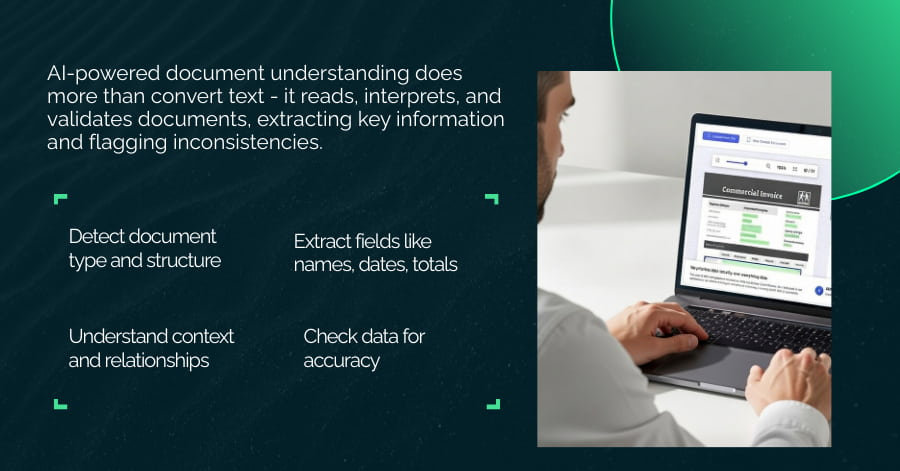
Every organization runs on documents. Invoices, contracts, medical records, compliance forms, shipping manifests. The volume keeps growing, but the capacity to process them manually does not. Staff spend hours reading, extracting, and re-keying information that could flow automatically into business systems.
AI-powered document understanding systems address this problem directly. They read documents, interpret meaning, extract structured data, and trigger downstream actions.
Let’s look at how these systems work, what they can do in practice, and how to assess whether they fit your operational needs.
What Are AI-Powered Document Understanding Systems?
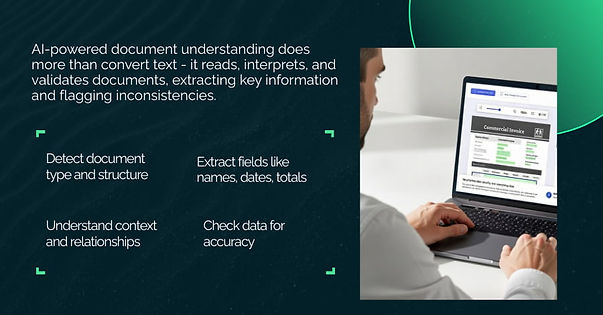
An AI-powered document understanding system does more than simple text recognition. It combines multiple technologies to interpret documents like a human would: recognizing structure, understanding context, identifying key information, and checking for accuracy.
Consider an invoice. A basic scanner produces an image. OCR converts that image to text. But document understanding identifies the vendor name, invoice number, line items, quantities, prices, and payment terms. It understands that "Net 30" means payment due in 30 days. It flags if the total does not match the sum of line items. That shift from reading to understanding is what distinguishes these systems.
Why Traditional Document Processing No Longer Scales
Manual processing introduces delays and errors, especially at scale. A peer-reviewed study published in the Journal of the American Medical Informatics Association measured manual transcription errors in outpatient workflows and found error rates of roughly 3% to 4%, consistent with prior research that places manual data entry errors in the low single-digit percentage range.
At a 1% error rate across 5,000 monthly transactions, that still results in around 50 items requiring investigation and correction. Each correction adds operational overhead and increases downstream risk.
Manual processing also scales poorly. As document volume grows, staffing must grow with it. Training takes time, quality varies by reviewer, and peak periods often create backlogs.
Why OCR Alone Is Not Enough
OCR converts images to text. It handles what it can see but understands nothing about what it reads.
OCR can:
- Convert scanned documents to searchable text
- Recognize printed and some handwritten characters
- Process documents at high speed
OCR cannot:
- Identify what a field means (is "12/05" a date or a reference number?)
- Extract structured data from unstructured layouts
- Validate whether extracted values make sense
- Handle documents where meaning depends on context
Structured vs. Unstructured Documents: The Core Challenge
Structured documents follow predictable formats. A bank statement has account numbers, transactions, and balances in consistent locations. Rule-based systems can handle these with templates.
Unstructured documents vary. Contracts from different law firms use different clause structures. Invoices from different vendors place information in different locations. Emails contain relevant data embedded in free-form text. Rule-based systems break when formats change because they cannot adapt without manual reconfiguration.
How AI-Powered Document Understanding Systems Work
These systems combine multiple technologies into an integrated pipeline. Each component handles a specific task, and together they produce accurate, validated output.
Optical Character Recognition (OCR)
OCR remains the foundation. It converts document images into machine-readable text. Modern OCR handles poor quality scans, skewed pages, and mixed fonts better than earlier systems. But OCR is a prerequisite, not a solution. The text it produces still requires interpretation.
Natural Language Processing (NLP)
NLP extracts meaning from text. It identifies entities (names, dates, amounts, addresses), understands intent (is this a request, confirmation, or complaint?), and interprets context (does "Apple" refer to the company or the fruit?).
NLP enables the system to understand that "Please remit payment within 30 days" and "Net 30" convey the same requirement.
Computer Vision
Computer vision interprets visual structure. It identifies tables, checkboxes, signatures, headers, and section boundaries. This matters because document meaning often depends on layout. A number in a "Total" column means something different from the same number in a "Quantity" column.
Machine Learning and Deep Learning
Machine learning models learn from examples rather than following fixed rules. They handle variation because they recognize patterns across thousands of document samples. When a new vendor sends invoices in a slightly different format, the system adapts rather than failing.
Large Language Models (LLMs)
LLMs represent a significant capability increase. They can reason about documents, answer questions, summarize content, and explain findings. Earlier systems extracted fields. LLMs can interpret clauses, identify obligations, and flag potential issues that require human review.
End-to-End Architecture
The typical pipeline flows as follows: document ingestion, image preprocessing, OCR, layout analysis, entity extraction, validation, and output to downstream systems. Each stage feeds the next. Confidence scores indicate extraction reliability. Low-confidence extractions route to human review.
Key Capabilities of Document Understanding Systems
Document understanding systems differ from basic automation in how they treat documents. Instead of moving text between systems, they interpret document content and structure so it can be used reliably in downstream workflows. The capabilities below reflect what these systems typically handle in production.
Capability | Function |
Classification | Identifies and routes document types |
Data extraction | Captures fields from varying layouts |
Semantic understanding | Links entities and obligations |
Validation | Checks totals and required fields |
Question answering | Finds answers from documents |
Summarization | Provides brief overviews |
Document Classification
The system identifies the type of document based on its content and structure. This includes common business documents such as invoices, purchase orders, contracts, and identity documents.
Classification allows documents to route automatically to the correct workflow or review queue, which removes the need for manual sorting and reduces delays at intake.
Intelligent Data Extraction
The system extracts specific fields based on context rather than fixed positions. It identifies values such as dates, amounts, names, and reference numbers even when labels, layout, or wording differ across documents.
This reduces dependence on rigid templates and lowers the effort required to handle format changes over time.
Semantic Understanding
Beyond extracting fields, the system captures basic relationships between entities. In a contract, it can associate parties with obligations, link dates to terms, and connect conditions to outcomes. This level of understanding supports tasks such as obligation tracking and structured review, without attempting to replace human judgment.
Validation and Consistency Checks
Extracted data is checked for internal consistency and basic business rules. Examples include verifying that totals match line items, ensuring required fields are present, or confirming that values fall within expected ranges. These checks help catch errors before data moves into financial, operational, or compliance systems.
Question Answering
Users can query documents using natural language. Instead of searching through long documents manually, they ask focused questions and receive answers tied to specific sections of the source document. This supports faster access to information while keeping the original context available.
Automated Summarization
The system can produce short summaries of longer documents by identifying key sections and information. These summaries provide a quick overview of the content and help readers decide where deeper review is needed, rather than replacing full document analysis.
Types of Documents These Systems Process
Document understanding systems handle a wide range of documents across industries, adapting to different formats and content types.
Financial Documents: Invoices, receipts, bank statements, tax forms. High volume, repetitive, accuracy-critical.
Legal Documents: Contracts, agreements, policies, amendments. Complex language, obligation tracking, risk identification.
Healthcare Documents: Medical records, lab reports, insurance claims. Sensitive data, regulatory requirements, clinical terminology.
Identity Documents: Passports, driver's licenses, utility bills. KYC compliance, fraud detection, onboarding workflows.
Operational Documents: Purchase orders, shipping documents, internal forms, emails. Varied formats, cross-departmental workflows.
Real-World Use Cases Across Industries
Document understanding systems address specific pain points in document-heavy workflows, replacing repetitive manual effort with structured, reliable processing.
Finance and Accounting Automation
Accounts payable and receivable teams deal with high volumes of invoices, receipts, and statements. Manual processing is slow, error-prone, and burdens reconciliation and audits. Document understanding systems automatically extract vendor information, amounts, line items, and payment terms, validate data against purchase orders, and route documents for approval. This reduces processing time, lowers errors, and helps ensure financial compliance.
Legal Contract Analysis and Risk Detection
Legal teams manage contracts, agreements, and amendments, often under tight deadlines. Manually reviewing each document is slow and inconsistent. Document understanding systems identify key clauses, flag unusual terms, and track obligations across multiple documents. Lawyers can focus on risk assessment and decision-making, while repetitive review tasks are handled automatically.
Healthcare Records Processing and Insights
Healthcare organizations process patient records, lab results, and insurance forms. Manual entry is time-consuming and prone to errors, which can impact workflow efficiency. These systems convert unstructured clinical notes and structured forms into usable data, reducing administrative burden and allowing healthcare professionals to spend more time on patient care and operational tasks.
Insurance Claims and Policy Review
Claims teams face pressure to process claims quickly while minimizing errors and detecting potential fraud. Document understanding systems extract claim details, match them against policy data, and flag anomalies or fraud indicators. This accelerates claim cycles, reduces manual review, and improves accuracy without replacing professional judgment.
Logistics, Supply Chain, and Shipping Documents
Shipping, customs, and supply chain operations involve large volumes of bills of lading, purchase orders, and delivery documents. Manual handling leads to delays, mistakes, and penalties. Automated extraction and validation of these documents help reduce errors, speed processing, and improve operational reliability.
HR, Onboarding, and Internal Operations
Human resources teams process onboarding forms, payroll documents, and internal reports. Manual review slows employee onboarding and increases administrative overhead. Document understanding systems extract and validate data automatically, enabling faster onboarding, reducing repetitive tasks, and improving the employee experience.
Business Benefits of AI-Powered Document Understanding
Document understanding systems help speed up tasks like reviewing invoices, extracting contract clauses, or processing claims. They cut down on manual errors and let teams handle more documents without needing extra staff.
Benefit | What it does |
Efficiency | Speeds up document review and processing |
Accuracy | Reduces manual errors and ensures consistency |
Scalability | Handles higher volumes without extra staff |
Decision-Making | Gets information to stakeholders faster |
Compliance | Tracks extractions and reviews for auditability |
Operational Efficiency and Cost Reduction
Automation reduces the time spent on repetitive tasks. For example, invoice processing or form review that once took several hours per document can now be completed in minutes. Throughput increases without adding headcount, lowering operational costs and freeing staff for higher-value work.
Accuracy, Consistency, and Error Reduction
Human review introduces variability. Staff may interpret formats differently or make simple transcription errors. Automated extraction ensures each document is processed the same way every time, reducing errors and supporting reliable reporting and operational decisions.
Scalability Without Linear Headcount Growth
Processing capacity scales with document volume rather than staffing. Organizations can handle seasonal spikes or business growth without proportionally increasing headcount. This allows for predictable resource planning and avoids backlogs during peak periods.
Faster Decision-Making and Time-to-Insight
By delivering structured data quickly, systems accelerate the flow of information to decision-makers. Approvals, reconciliations, and contract reviews that previously took days can now happen in hours, supporting faster operational and strategic decisions.
Improved Compliance and Risk Management
Every extraction is logged with details such as data fields, confidence levels, and human review of exceptions. This creates a traceable audit trail, simplifying compliance reporting, supporting internal controls, and reducing regulatory risk.
AI Document Understanding vs. Traditional Automation
Document understanding systems interpret document content and context, rather than just converting or moving text. Compared with OCR, rule-based tools, or RPA, they handle variations in format and extract meaning, though they require setup and training.
Approach | Strengths | Limitations |
OCR Only | Fast text conversion | No understanding of meaning |
Rule-Based | Predictable for fixed formats | Breaks when formats change |
RPA | Good for repetitive tasks | Cannot handle document variation |
AI Document Understanding | Adapts to variation, understands context | Requires training data, higher complexity |
Challenges and Limitations to Consider
While AI-powered document understanding can improve efficiency and accuracy, it comes with practical limitations that you should understand before implementation.
Data Quality and Document Variability
Accuracy depends heavily on input quality. Poor scans, damaged documents, inconsistent layouts, or handwriting can reduce extraction reliability. Systems may struggle with documents that differ significantly from the types seen during training, so validating input and standardizing document capture can improve results.
Model Training and Annotation Requirements
AI models rely on labeled examples to learn patterns. Common document types with abundant data perform well, but rare or unusual formats may require additional annotations. Providing representative training data upfront helps maintain accuracy across all document types.
Handling Edge Cases and Ambiguous Documents
Some documents contain unusual layouts, ambiguous language, or conflicting information. These require human judgment. Most implementations include a human-in-the-loop step to review exceptions and guide the system on ambiguous cases.
Security, Privacy, and Regulatory Compliance
Documents often contain sensitive personal or financial information. Systems should implement encryption, access controls, and compliance measures aligned with standards such as HIPAA and GDPR. Maintaining audit logs and secure storage is critical for regulatory accountability.
Explainability and Trust in AI Decisions
Users need to understand why the system extracted certain fields or made specific interpretations. Lack of transparency can reduce trust and complicate exception handling. Clear logging, confidence scores, and review interfaces help maintain oversight and accountability.
Build vs. Buy
Choosing between a commercial platform and a custom system depends on your document types, workflows, and long-term objectives.
When Off-the-Shelf Tools Work Best
If your documents are standard - like invoices, receipts, or forms and don’t require extensive customization, commercial platforms are practical. They deploy quickly, have lower upfront costs, and manage updates and maintenance for you.
When Custom AI Systems Are the Better Choice
For unique documents, proprietary formats, or workflows that give your organization a competitive advantage, a custom solution may be more appropriate. It provides greater control, deeper integration, and tailored functionality, but requires higher upfront investment and ongoing maintenance.
Cost, Scalability, and Integration Considerations
Consider more than just initial costs. Account for integration effort, training, and ongoing operation. Ensure the system can scale with your document volume and that the solution aligns with long-term operational goals.
The Role of LLMs in Modern Document Understanding
Large language models extend the capabilities of traditional document understanding systems. They do more than extract fields - they can reason about content, identify inconsistencies, and interpret relationships across documents.
This evolution allows organizations to move from basic automation toward insights and actionable understanding.
From Data Extraction to Reasoning
Earlier systems focused on extracting structured fields like names, dates, or amounts. LLMs add reasoning and synthesis.
For example, they can flag when two contract clauses conflict, recognize unusual terms for a document type, or identify obligations that require action by specific dates. This capability allows teams to spot risks or opportunities that would otherwise require careful manual review.
Prompt-Based vs. Fine-Tuned Document Understanding
There are two common approaches to applying LLMs in document workflows:
- Prompt-Based: Use a general-purpose LLM with task-specific instructions. Flexible and quick to deploy, but performance may vary across specialized document types.
- Fine-Tuned: Train a model on domain-specific documents. Accuracy improves for those documents, but the model is less adaptable to new formats or topics.
Choosing between these approaches depends on whether the goal is flexibility across many documents or higher precision for specific types.
Combined Architectures
Production systems often combine multiple technologies:
- OCR converts images or scanned documents into text.
- Traditional ML identifies fields and patterns in structured documents.
- LLMs provide reasoning, validation, and context-aware interpretation.
Each component focuses on what it does best, creating a pipeline that balances speed, accuracy, and intelligence.
Implementation Best Practices
Implementation works best with clear objectives, phased adoption, and human oversight.
1. Start with High-Impact Documents
Start with a small set of high-volume documents, like invoices from a single vendor. Define which fields to extract and validation rules for example, ensure totals match line items and dates are within expected ranges. Have humans review exceptions. This allows the system to improve gradually before scaling to other document types.
2. Define Clear Extraction and Validation Objectives
Be specific about which fields matter, how to validate them, and acceptable accuracy. Ambiguous requirements lead to inconsistent results. For instance, in contracts, clearly define which clauses to track and what constitutes a risk.
3. Human-in-the-Loop Review and Feedback
Edge cases, ambiguous language, or unusual document layouts still require human judgment. Human review of exceptions not only ensures accuracy but also provides feedback that improves the model over time.
4. Plan for Continuous Improvement
Capture corrections, retrain models periodically, and monitor accuracy. This helps the system adapt to new formats, terminology changes, and operational shifts. Continuous iteration maintains reliability as document types evolve.
Future Trends in AI-Powered Document Understanding
Document understanding is gradually moving toward faster processing and more practical reasoning:
- Handling multiple data types: Systems are starting to work with text, tables, and images together. For example, a logistics team could check shipping manifests against purchase orders and customs forms to spot mismatches.
- Faster, near real-time processing: Documents can be validated and routed as they arrive, which shortens approval or claims cycles without waiting for batch processing.
- Decision support with oversight: Some systems can suggest actions, like flagging overdue payments or noting upcoming contract deadlines, while humans review exceptions.
- Supporting enterprise operations: Over time, these systems help standardize workflows across finance, legal, HR, and operations by turning unstructured documents into structured information for easier review and planning.
Final Thoughts
Documents contain the information you rely on every day. AI-powered document understanding can help you pull that information out more consistently and with less manual effort.
A good approach is to start with the documents or workflows that cause the most friction. Set clear goals, track results, and keep humans involved for cases that need judgment. The system is useful when it helps solve real operational problems, not just when it processes documents.
Connect with our experts to see how AI-powered document understanding can fit into your workflows and help your team work more efficiently.
Frequently Asked Questions
What is an AI-powered document understanding system?
It’s a system that reads and interprets documents using AI, extracting structured information and providing context. This allows automation of routine tasks and supports decision-making beyond basic text recognition.
How does it differ from OCR?
OCR converts images or scans into text. Document understanding goes further by interpreting meaning, identifying key entities, checking consistency, and enabling reasoning over the content.
What types of documents can these systems process?
They can handle invoices, contracts, medical records, insurance claims, identity documents, emails, and other structured or unstructured business documents across industries.
What technologies are involved?
They combine OCR for text extraction, natural language processing to understand context, computer vision for layout and tables, machine learning for pattern recognition, and large language models for reasoning and summarization.
Can they handle unstructured documents?
Yes. Unstructured documents, like contracts or emails, often vary in format and wording. These systems can interpret them where rule-based approaches would fail.
Do they replace human reviewers?
No. They support humans by automating repetitive tasks. Humans still handle exceptions, validate outputs, and guide continuous improvemen