CLIs for AI: Why Agentic Systems Prefer Command-Line Tools

Most products are not agent-compatible. They were designed for humans using graphical interfaces, clicking buttons, and filling out forms. That approach works for human users, but it does not translate well to systems that interact with software programmatically.
AI agents operate through text. They generate commands, execute them, and read structured outputs to decide the next step. They do not click through interfaces or interpret visual layouts, which makes traditional dashboards and web apps difficult for them to operate reliably.
Command-line interfaces solve this problem. A CLI exposes product functionality through predictable commands and text output, which makes it easier for both humans and AI agents to interact with the system.
Let's break down why this matters, how it works, and what it means for how you build products from here.
What Are CLIs for AI?
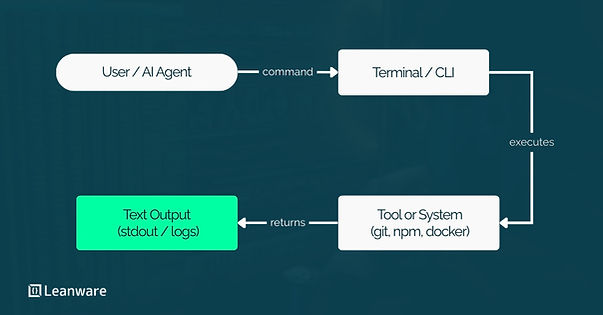
A CLI (Command-Line Interface) is a text-based interface where you type a command and the system returns a result. No windows. No buttons. Just input and output.
If you have used git commit, npm install, brew update, or docker ps, you have used a CLI. These tools accept structured commands, execute operations, and return text output to your terminal. They are composable, scriptable, and predictable. You give them the same input, you get the same output.
What Makes a CLI "AI-Compatible"?
Not every CLI is equally useful for agents, but most are usable by default. What makes a CLI particularly agent-friendly comes down to a few properties.
Deterministic behavior means the same command produces the same output structure every time. Agents rely on this predictability to reason about results without guessing what format the response will take.
Text-based I/O is essential because agents process tokens, not pixels. A CLI that returns structured text, especially JSON, gives an agent something it can parse, filter, and act on immediately. Composability matters because agents, like experienced engineers, chain commands together. The output of one command becomes the input of the next. Scriptability rounds it out. If a tool can be invoked from a shell script, it can be invoked by an agent. No special adapter required.
These are not new properties. They are the same principles that made Unix tooling powerful decades ago. The difference is that now there is a new class of user, autonomous software agents, that benefits from them even more than humans do.
Why CLIs Are Suddenly Strategic in the Age of Agentic AI
The reason CLIs are entering strategic conversations in 2026 has nothing to do with developer preference and everything to do with how agents interact with the world.
Legacy Technology = Agent-Native Infrastructure
There is an irony worth noting here. The Unix philosophy, build small tools that do one thing well and communicate through text, was articulated in the 1970s. Pipes, filters, and composable commands were the original design pattern.
That philosophy fell out of fashion as the industry moved toward graphical interfaces, web applications, and rich visual experiences. But the design principles behind it, structured text, modularity, predictable behavior, are exactly what LLM-based agents need to operate effectively.
What we called "legacy" turned out to be agent-native. The tools that never needed a UI are the tools that agents can use without any adaptation layer.
Why AI Agents Prefer Text-Based Interfaces
Large language models reason in tokens. Their entire cognitive loop, receiving input, processing it, producing output, operates on sequences of text. When an agent interacts with a CLI, the interaction is native to how the model already thinks.
Compare this with a web interface. For an agent to use a browser-based product, it needs a computer vision layer to interpret the screen, a browser automation framework like Playwright or Selenium to interact with elements, and significant error-handling logic to deal with pages that load asynchronously, change layout, or require authentication flows that break headless sessions. The overhead is enormous, and the failure rate is high.
A CLI eliminates all of that. The agent generates a shell command, executes it, reads stdout, and reasons over the result. No rendering engine. No DOM. No vision model. Just text in, text out.
The Terminal as a Universal API Surface
The terminal is not just a place to run individual commands. It is a composable execution layer where agents can chain operations into pipelines.
Consider what an agent can do from a single terminal session: install a tool, query an API, filter the results, transform the output, and pipe it into another tool that generates a report or triggers a deployment. Each step is a standard shell command. The agent orchestrates them the same way an experienced engineer would, except it does it programmatically, without context-switching between browser tabs and documentation pages.
This is why the terminal is becoming the default execution surface for agentic workflows. It is universal, composable, and requires no special integration to use.
Insights from OpenClaw's Creator and Andrej Karpathy
Two recent perspectives help clarify this argument and are worth understanding.
"Build for Agents" - The New Product Design Paradigm
Andrej Karpathy put it directly: CLIs are exciting precisely because they are "legacy" technology, and that legacy status is what makes them immediately usable by AI agents. No wrappers, no middleware, no integration work.
He posed a set of questions that every product team should be asking. Can agents access and use your product? Are your docs exportable in markdown? Have you written skills for your product? Can your product be used via CLI or MCP?
The framing is deliberate. "Build for agents" is not a feature request. It is a product design paradigm. The fastest-growing user base in software is not human. Products that are only accessible through graphical interfaces are invisible to that user base.
OpenClaw (formerly Clawdbot), an open-source personal AI assistant created by Peter Steinberger, demonstrates this practically. It connects messaging platforms to an AI agent that runs locally, using CLI tools and skills as its execution layer. The agent installs tools, runs commands, chains outputs, and automates workflows, all through the terminal. It is a working example of what agent-first infrastructure looks like when CLI is the foundation.
Why Agents Can Natively Use CLIs Without Wrappers
The process is simple. An agent receives a task, decomposes it into steps, generates the shell commands needed for each step, executes them, reads the output, and decides what to do next. If a command fails, the agent reads stderr, adjusts its approach, and retries.
This loop, plan, execute, observe, adjust, is the core agentic pattern. CLIs fit into it with zero friction because they were designed for exactly this kind of structured interaction. The agent does not need a client library, an SDK, or an API wrapper. It needs a terminal and a well-documented command.
How AI Agents Use CLIs
Let's look at what this means in actual workflows.
Installing and Operating Tools via CLI
One of the most underappreciated capabilities of agentic CLI usage is that agents can install their own tools. An agent tasked with analyzing prediction market data does not need that tool pre-installed. It can run brew install polymarket or the equivalent installation command, verify the installation, and immediately start querying data.
The Polymarket CLI, built in Rust, is a clean example. It exposes market data, order placement, and position management through structured terminal commands. Every command supports both human-readable table output and machine-readable JSON output. An agent can install it, run polymarket markets list --limit 10 -o json, parse the result, and reason over it, all without any custom integration work.
Navigating Codebases with the GitHub CLI
The GitHub CLI (gh) gives agents direct access to repositories, pull requests, issues, discussions, and code, all from the terminal. An agent can clone a repo, inspect open issues, review PR diffs, check CI status, and even create new issues or PRs based on its analysis.
This is autonomy at a practical level. Instead of building a custom GitHub integration for every agent workflow, the CLI provides a stable, well-documented command surface that any agent can use immediately.
Creating Dashboards, Pipelines, and Apps from Terminal
This is where composability becomes powerful. An agent is not limited to running single commands in isolation. It can chain CLI outputs into multi-step workflows that produce real artifacts.
Fetch data from one CLI, transform it with standard Unix tools like jq, grep, or awk, pipe the results into a script that generates a visualization, and serve it as a web application. The agent orchestrates the entire pipeline from a single terminal session.
Example: Claude Building a Polymarket Dashboard in 3 Minutes
Karpathy shared a concrete example that illustrates this well. He asked Claude to install the Polymarket CLI, query the highest-volume markets, and build a terminal dashboard showing prices and 24-hour changes. The entire process took roughly three minutes.
From CLI Installation to Data Dashboard
The workflow followed a natural sequence. The agent installed the Polymarket CLI, ran a command to list active markets sorted by volume, parsed the JSON output, and rendered a formatted dashboard in the terminal showing market names, current prices, and price changes.
No API key management. No SDK setup. No frontend framework. The CLI gave the agent everything it needed to go from zero to a working data display in minutes.
Turning CLI Output into Web Apps or Pipelines
The dashboard did not have to stay in the terminal. Because the underlying data came as structured text, the agent could just as easily have generated an HTML page, a React component, or a data pipeline that feeds into a monitoring system.
That is the key point about composability. The CLI output is not an endpoint. It is a building block. The same data can be routed into any downstream system the agent can write code for.
Why CLIs Are More Powerful Than Web UIs for Agents
CLIs expose functionality through commands and structured text output. This makes them easier for agents to operate reliably, while web interfaces require additional layers to simulate human interaction.
Web Interfaces Require Automation Layers
For an agent to interact with a web application, it needs to simulate human behavior: launching a browser, navigating to pages, waiting for elements to render, clicking buttons, handling authentication, and managing state across sessions.
Tools like Playwright and Selenium exist for this, but they add significant complexity. Pages change structure without warning. JavaScript-heavy applications render asynchronously. CAPTCHA challenges block automated sessions. Authentication flows require cookie management. Every one of these is a potential point of failure.
CLIs Are Deterministic and Scriptable
A CLI command either succeeds or fails. The output follows a predictable structure. Error codes are meaningful. This determinism is exactly what agents need to reason reliably.
When an agent runs gh pr list --state open --json number,title,author, it knows what the response format will be. It can parse it, reason over it, and take action without defensive coding against UI changes or rendering quirks.
Composability: Chaining Commands Into Pipelines
The Unix pipe (|) is one of the most powerful abstractions in computing. It lets you connect the output of one command directly to the input of another.
Agents leverage this naturally. polymarket markets list -o json | jq '.[] | select(.volume > 1000000)' | head -10 is a single pipeline that fetches markets, filters by volume, and returns the top ten. An agent can compose these pipelines dynamically based on the task at hand, combining tools that were never explicitly designed to work together.
Can Agents Use Your Product?
Agents can use a product when its functionality is accessible through programmatic or text-based interfaces instead of only through a graphical UI.
This typically means exposing capabilities through APIs, CLIs, or protocols like MCP, providing machine-readable documentation, and allowing the system to run without manual interaction.
Are Your Docs Machine-Readable?
PDF documentation and HTML-only knowledge bases are not agent-friendly. Agents consume structured text, specifically markdown, most effectively. If your documentation is not exportable in a format that agents can parse and reason over, you have an accessibility gap that is growing wider by the month.
Standards like llms.txt are growing to address this, providing a structured file that explains a site's structure and content in a way that agents can consume.
Have You Written "Skills" for Your Product?
A skill, in the agent context, is a documented set of instructions that tells an agent how to use a product for specific tasks. Think of it as a structured playbook: what commands to run, what inputs to provide, what outputs to expect, and how to handle common edge cases.
Products that ship with agent skills give themselves a distribution advantage. Agents can discover and use them without any human integration work.
Does Your Product Expose a CLI or MCP Interface?
If the only way to interact with your product is through a graphical interface, agents cannot use it without a fragile automation layer. Exposing a CLI, an API, or an MCP interface makes your product immediately accessible to the growing ecosystem of autonomous agents.
Can It Be Used Headlessly?
Headless operation means your product can be used without a display, without a browser, without any visual interface at all. If your product requires a GUI to function, it requires human involvement by definition. Headless compatibility is the baseline for agent accessibility.
CLI vs API vs MCP: What's the Difference for Agents?
All three are valid interfaces for agent interaction, but they address different use cases and involve different constraints.
APIs: Structured but Require Integration
APIs provide structured, programmatic access to a service. They are well-defined, versioned, and documented. But using an API typically requires authentication setup, client library installation, and integration code that maps the API's endpoints to the agent's workflow.
For a one-off task, that setup overhead can be significant. APIs are most valuable when the agent needs deep, sustained interaction with a single service.
CLIs: Immediate Agent Usability
CLIs sit in a unique position. They are already installed or installable via a single command. They require no integration code. The agent generates a shell command, runs it, and reads the output. The barrier to entry is as low as it gets.
For breadth, where an agent needs to interact with many tools across a single workflow, CLIs are often the fastest path to usability.
MCP: The Emerging Agent Protocol Layer
The Model Context Protocol, introduced by Anthropic in November 2024 and now governed by the Linux Foundation under the Agentic AI Foundation, is a standardized way for AI agents to discover and interact with external tools and data sources.
MCP does not replace CLIs or APIs. It adds a layer of discoverability and interoperability on top of them. An MCP server can expose a CLI tool's functionality in a format that any MCP-compatible agent can understand and use without custom integration. Think of it as the standardization layer that makes the entire tool ecosystem more accessible to agents.
Adoption is growing. OpenAI, Google DeepMind, and a growing list of enterprise tooling vendors have integrated MCP support. For product builders, exposing an MCP interface alongside your CLI is becoming a competitive advantage.
Designing Agent-First Infrastructure
Designing agent-first infrastructure means building systems that agents can access and operate programmatically. Instead of relying only on graphical interfaces, products should expose capabilities through structured inputs and outputs so agents can discover features, execute tasks, and interpret results reliably.
Export Everything as Text
If your product generates data, make it available as structured text. JSON, CSV, markdown, plain text. If an agent cannot read the output, the product is invisible to automated workflows.
Deterministic Outputs Over Visual Interfaces
Visual interfaces are valuable for human users. But deterministic, machine-readable outputs are what agents need. Where possible, support both. A --output json flag on your CLI is a small investment that makes your tool immediately usable by every agent that can execute a shell command.
Embrace Composability
Design your tool to work well with others. Accept stdin. Produce stdout that other tools can consume. Follow the Unix convention of doing one thing well and letting users (and agents) compose behavior by chaining tools together.
This is not new engineering advice. It is decades-old wisdom that happens to be perfectly aligned with how agentic systems work.
Why 2026 Is the Year of Agent-Ready Tools
The timing is not coincidental. Several trends are converging to make CLI-based agent infrastructure urgent.
The Rise of Autonomous Coding Agents
Claude Code, OpenAI's Codex CLI, and Google's Gemini CLI have moved agentic coding to daily workflow. These agents live in the terminal. They install tools, navigate codebases, run tests, commit code, and debug failures, all from the command line.
The terminal is their native environment, and every CLI tool you expose becomes a capability they can use.
Agents as Power Users
The mental model shift is significant. Your most active "users" may not be people. They may be software agents running tasks on behalf of people. These agents interact with more tools, more frequently, and with higher throughput than any individual human user.
Designing for this user class is not a niche concern. It is a product strategy question.
The Competitive Advantage of Being Agent-Compatible
Products that are accessible to agents get used by agents. Products that are not, don't. As agentic workflows become standard in engineering, operations, and data analysis, agent compatibility becomes a distribution channel.
The companies that recognize this early will have a structural advantage over those that continue building exclusively for human interaction.
Build. For. Agents.
The products that will matter most in the next few years are the ones agents can use without asking for help.
That does not mean abandoning your UI. It means adding interfaces that do not require one. A CLI. An MCP server. Machine-readable documentation. Deterministic outputs. Headless operation.
The bar is not high. But the gap between meeting it and ignoring it will widen quickly.
Checklist: Is Your Product Agent-Accessible?
Ask yourself: does your product expose a CLI or API that agents can use without a browser?
- Does it produce structured, machine-readable output like JSON or markdown?
- Is your documentation exportable in a format agents can parse?
- Have you published skills or usage guides written for agent consumption?
- Can your product be operated headlessly, without any GUI dependency?
- Does it support MCP or another agent protocol layer?
If you answered no to most of these, your product has a growing accessibility gap, not for humans, but for the user base that is scaling fastest.
Future-Proofing Your Tooling Stack
Agent compatibility is not a one-time checkbox. It is an infrastructure decision that compounds over time. The tools you expose today become the building blocks that agents compose into workflows tomorrow. Investing in clean CLI design, structured outputs, and protocol support now means your product stays relevant as the agentic ecosystem matures.
CLIs Are Not Old - They're Agent-Native
The narrative that CLIs are "legacy technology" has persisted for years. It was always incomplete. CLIs were never obsolete. They were just undervalued by a software industry that optimized primarily for visual interfaces.
Now that the fastest-growing class of software users operates entirely on text, the value proposition has flipped. CLIs are not a step backward. They are the most direct path to agent compatibility. Products built on composable, text-based interfaces are not just accessible to agents. They are preferred by them.
The terminal is not where software goes to die. It is where the next generation of autonomous systems goes to work.
You can also connect with us to make your product agent-ready, with support for designing and building AI systems, CLIs, APIs, and MCP integrations that agents can reliably interact with.
Frequently Asked Questions
What Are CLIs for AI?
CLIs for AI are command-line tools that allow users, including AI agents, to interact with software systems through text-based commands. Because they use structured input and output, AI agents can easily generate commands, execute them, and parse the results without needing a graphical interface.
Why Are CLIs Important for Agentic AI?
CLIs are important for agentic AI because they provide a deterministic, text-based interface that AI agents can natively understand and operate. Unlike graphical interfaces, CLIs require no visual interpretation or browser automation, making them faster and more reliable for autonomous agents.
How Do AI Agents Use CLI Tools?
AI agents use CLI tools by generating shell commands, executing them in a terminal environment, reading the output (stdout), and reasoning over the results. They can chain multiple commands together to complete complex workflows automatically.
Are CLIs Better Than Web Interfaces for AI Agents?
For AI agents, CLIs are often more efficient than web interfaces because they eliminate the need for UI automation tools like Selenium or Playwright. CLIs produce predictable text outputs that agents can parse directly, reducing complexity and failure points.
What Does "Build for Agents" Mean?
"Build for Agents" means designing products and services so autonomous AI systems can access and operate them directly. This often involves providing CLI access, structured APIs, machine-readable documentation, and deterministic outputs.
Can AI Agents Use Any CLI Tool?
In most cases, yes. If a CLI tool produces structured text output and follows predictable command patterns, AI agents can generate commands and interpret results. Well-documented and modular CLIs are especially agent-friendly.
What Makes a Product Agent-Compatible?
A product is agent-compatible if it provides machine-readable documentation, exposes a CLI or API interface, supports headless operation, and produces deterministic outputs that AI agents can parse and reason about.
What Is the Difference Between a CLI and an API for AI Agents?
An API provides structured programmatic access to a service, while a CLI provides command-based access through the terminal. APIs require integration work, whereas CLIs can often be used immediately by AI agents that generate and execute shell commands.
What Is MCP in Relation to AI Agents?
MCP (Model Context Protocol) is an open standard introduced by Anthropic that enables AI agents to interact with external tools and systems in a structured way. It makes tools more discoverable and interoperable for autonomous AI workflows and has been adopted by major providers including OpenAI and Google.
Why Are Legacy Tools Like CLIs Becoming Strategic Again?
Legacy tools like CLIs are becoming strategic because they were built around text-based interaction. Since large language models operate on text, they can natively use and combine CLI tools without needing additional interface layers.