AI for Small Businesses & SMBs | How AI Can Help & Costs

AI adoption is no longer limited to large enterprises. As of 2025, 39% of small and medium-sized businesses are using AI applications, up from 26% the previous year (OECD).
Generative AI is the most widely adopted category, now used by 26% of businesses to improve productivity and drive innovation.
Despite this growth, the majority of SMBs still haven’t implemented AI, often due to concerns around legal risk, data privacy, and misinformation.
This gap creates an advantage for those who move early. AI tools have become accessible, affordable, and fast to implement. A solo retailer using ChatGPT to generate product descriptions can reclaim 10 hours a week.
A five-person service firm using scheduling AI avoids dozens of back-and-forth emails. These aren’t speculative use cases - they’re already happening.
If you’re still on the sidelines, here’s how you can start using AI to gain operational leverage without a dedicated tech team or a massive budget.
What Is AI for Small Businesses?
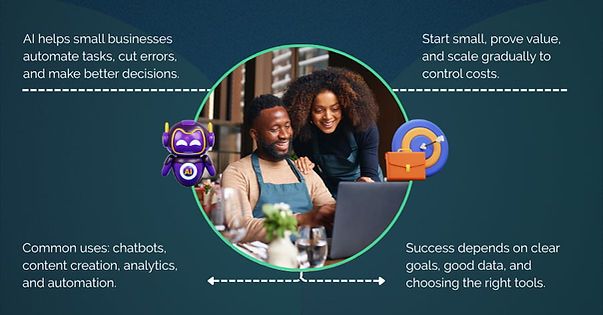
AI for small businesses involves applying artificial intelligence technologies to automate routine tasks, enhance productivity, and inform better decisions. It helps teams save time, reduce manual errors, and focus on higher-value activities.
Common ways small businesses use AI are:
- Automation: Reducing manual work in data entry, scheduling, and social media posting.
- Customer Service: Running chatbots that handle routine questions 24/7.
- Marketing: Personalizing campaigns and optimizing ads with customer data.
- Accounting: Automating invoicing, expense tracking, and reporting.
- Content Creation: Drafting product descriptions, blog posts, and social updates.
- Data Analysis: Spotting trends and forecasting demand to guide decisions.
Defining AI, Generative AI, and Machine Learning
AI (Artificial Intelligence): Systems designed to perform tasks that typically require human judgment. In a business setting, this could be a chatbot handling customer inquiries or a recommendation engine suggesting products.
Machine Learning: A subset of AI that improves performance based on historical data. For example, predicting which leads are likely to convert based on prior sales patterns.
Generative AI: Models trained to produce new content—text, images, or other media—based on prompts. This includes tools that can write marketing copy, summarize reports, or generate visual assets.
Why "AI for SMBs" Is Changing the Game
AI is changing the game for small businesses as it offers capabilities that once required larger teams and budgets. With the right tools, you can:
- Respond to customers faster without hiring more staff.
- Create marketing content and product descriptions in less time.
- Detect sales trends and forecast demand automatically.
- Reduce routine errors in finance and operations.
These advantages help handle more work and improve service without scaling costs as quickly.
However, adoption isn’t always simple. Many companies encounter higher-than-expected costs for data preparation, workflow changes, and security improvements.
Even when tools are affordable, preparing data and training staff can require more time and budget than planned.
IBM also reports that the global average cost of a data breach reached a record high in 2024, making security an important consideration for any AI deployment.
You don’t necessarily need to build everything yourself or commit to long enterprise contracts to begin. However, most small businesses still benefit from working with a technology partner to define clear use cases, select the right tools, and ensure smooth integration and adoption.
How AI Can Help Small Businesses

AI gives small businesses real advantages by reducing manual work, improving speed, and helping teams make better decisions. These five areas show where it has the most impact.
1. Improve Customer Service and Support
AI chatbots handle common questions, like order status, store hours, or returns, so teams spend less time on repetitive replies.
These tools can respond quickly and consistently, even outside normal working hours. Over time, they improve accuracy by learning from past interactions. This helps free up staff to focus on more complex customer needs.
2. Boost Productivity and Efficiency
AI can automate routine tasks that take up a lot of time. For example, it can transcribe meeting notes, organize them into summaries, schedule follow-ups, or draft reports.
This reduces manual work and keeps information organized without relying on extra staff or extended hours.
3. Reduce Costs and Manage Resources Better
AI helps make planning and budgeting more predictable. Forecasting tools can analyze sales trends to set inventory levels. Maintenance systems can monitor equipment and flag early signs of issues.
These insights help avoid over-ordering, shortages, or unexpected repairs, which keeps costs in check.
4. Support Marketing and Content Creation
AI can generate first drafts of content, like emails, social posts, or product descriptions, which teams can review and adapt.
This speeds up production without sacrificing quality. Some tools also track how content performs, helping teams see what connects best with customers.
5. Improve Decision-Making with Data Insights
AI can process large amounts of data to highlight patterns or trends that are hard to spot manually. It can suggest which products are selling together or when demand is likely to change.
While AI can surface useful insights, decisions still need human judgment to fit the business context.
Top AI Tools & Use Cases for SMBs
The tools you pick should fit your specific business goals, budget, and how much effort you can commit to setup and maintenance.
Here are some options to explore. Some are dedicated AI tools, while others are established platforms that have added AI capabilities to help streamline everyday work.
Tool | Category | Use Case |
Tidio | Chatbots & Customer Service | Automate FAQs, live chat |
Intercom | Chatbots & Customer Service | Customer journey automation |
Zendesk AI | Chatbots & Customer Service | Scalable AI-powered support |
Drift | Chatbots & Customer Service | Qualify leads, automate sales chats |
ChatGPT | Marketing & Content Creation | Draft blogs, emails, social posts |
Jasper | Marketing & Content Creation | Generate marketing copy |
Canva Magic | Marketing & Content Creation | Design visuals for campaigns |
Zapier + OpenAI | Workflow & Productivity | Automate cross-tool workflows |
Motion | Workflow & Productivity | AI scheduling, task prioritization |
Notion AI | Workflow & Productivity | Summarize notes, organize docs |
QuickBooks AI | Finance & Inventory | Automate expense tracking |
Xero | Finance & Inventory | Process invoices, reconcile accounts |
Fathom | Finance & Inventory | Visual financial analysis |
Inventoro | Finance & Inventory | Predict inventory needs |
TradeGecko | Finance & Inventory | Optimize inventory and demand |
Best Practices for Implementing AI

It starts with setting clear goals, understanding your constraints, and taking a structured approach. The following are the ways to plan and implement AI successfully.
1. Define Clear Use Cases and Objectives
Start with a simple business case. What specific problem will AI help you solve - manual data entry, slow customer support, or inconsistent content? Prioritize the areas with the most impact.
2. Build a Data Strategy Early
AI performance depends on the quality of your data. Review what you already collect - sales records, customer interactions, operational data - and look for gaps or inconsistencies. Well-prepared data speeds up integration and improves accuracy.
3. Select the Right Tools and Approach
Use a clear evaluation checklist:
- Does the tool adapt and improve, or just follow fixed rules?
- Can it connect to your current systems without heavy development?
- Are pricing and support clear?
Remember, you don’t always need custom software - no-code and low-code platforms can often get you started with less complexity.
4. Train Your Team and Manage Change
Your team needs time and context to adopt new tools. Plan for training - usually a few days to a week - and share early wins to build confidence and reduce resistance.
5. Measure Results and Scale Gradually
Track specific outcomes like hours saved, faster response times, or fewer errors. Use this data to fine-tune workflows. Once you see consistent value, expand AI step by step into other areas.
Common Challenges & How to Overcome Them
AI adoption often looks simple, but it involves real operational and technical hurdles. You can address most of these with preparation and clear expectations.
1. Data Privacy, Security, and Compliance
Handling sensitive data requires clear safeguards. If you work in healthcare, finance, or any regulated industry, confirm early that your AI systems meet standards like HIPAA or PCI-DSS.
IBM reports that the average global cost of a data breach reached USD 4.88 million in 2024, with large incidents costing far more.
Always review how vendors store and process your data. Check who has access, what encryption they use, and whether they provide clear compliance documentation.
2. Integration with Existing Systems
Integrating AI into older or fragmented systems can create data inconsistencies and workflow disruptions. Many businesses underestimate the work required to integrate new workflows with CRMs, ERPs, or custom databases.
Map out integration steps before you commit. If a tool needs significant rework or custom development. If so, consider phased adoption or modern alternatives with strong API capabilities.
3. Cost, Budget, and Limited Resources
While AI implementation can appear costly, it doesn’t have to be prohibitive. Subscription-based AI services (AIaaS) and pre-built models have made entry more affordable.
According to Deloitte, organizations are at different stages of adoption maturity - many still in the early phases of scaling capabilities.
Practical considerations:
- Compare subscription costs to hiring or outsourcing.
- Start with smaller, targeted projects to validate ROI.
- Expect ongoing maintenance and upgrades as systems evolve.
4. Building Internal Expertise
You don’t need an advanced technical background to start. Most AI tools are designed for non-technical teams and can be learned incrementally. Training timelines vary depending on the complexity of your workflows, but initial familiarity can often be achieved in a few weeks of regular use.
Assign an internal point person to coordinate training and support. This helps reduce reliance on external consultants and makes your adoption more sustainable.
AI Use Cases Across Industries
Small and midsize businesses use AI in practical ways to improve operations and increase profitability.
1. Retail & E-commerce
- Automating product recommendations based on browsing or purchase history.
- Using chatbots to handle routine customer service questions and order tracking.
- Analyzing inventory and sales trends to inform restocking decisions.
2. Professional Services
- Generating drafts for proposals, reports, and research summaries.
- Automating appointment scheduling and reminders.
- Summarizing meeting notes and client communications.
3. Hospitality & Food Services
- Adjusting pricing dynamically in response to booking patterns and demand.
- Automating responses to reviews and frequently asked questions.
- Forecasting demand to reduce over-ordering and waste.
4. Manufacturing & Logistics
Predicting maintenance needs by analyzing equipment sensor data.
Optimizing inventory levels and procurement schedules.
Automating quality checks or document processing in operations.
How Much Does AI Cost for Small Businesses?
AI pricing varies widely depending on your use case, infrastructure, vendor, and how quickly you scale adoption. There’s no single price tag. Costs range from inexpensive subscription tools to large custom development and infrastructure investments.
Broader AI Implementation Costs
Beyond tool subscriptions, total cost depends on factors like data preparation, infrastructure, and expertise. For example:
Custom Development
A basic MVP chatbot or predictive model can cost anywhere from $6k to $50k to build.
Larger, complex systems can run $300,000+, especially when developed by US-based AI consultants billing $200-$350/hour.
Internal AI Teams
Hiring full-time talent is expensive. An in-house team can cost $400k to $1M+ per year, including salaries, benefits, and tools.
Infrastructure
Training and running large models requires substantial compute resources.
- One NVIDIA H100 GPU costs around $30k.
- Cloud GPU rentals range from $1.50 to $2.60 per hour.
- You’ll also need to budget for storage, networking, and energy costs.
API Usage
Many services charge per request or token. Examples:
- OpenAI GPT-4: ~$0.03 per 1K input tokens + ~$0.06 per 1K output tokens.
- Amazon Bedrock: ~$0.003-$0.015 per 1K tokens.
- Google Vertex AI: ~$0.001 per 1K characters
Sample Monthly Budgets
Here’s how total costs can look in practice:
Business Size | Estimated Monthly Spend |
Solopreneur | ~$50-$200 |
Small Team (10) | ~$300-$800 |
Midsize Team (50) | ~$1,500-$3,000+ |
Year-two costs often drop as you consolidate tools and automate more processes.
Cost Management and ROI
Most small businesses underestimate hidden expenses, especially data cleaning, integration, and security. For example:
- Data Preparation:Cleaning and organizing data can take longer than planned and add significant cost.
- Security and Compliance:The average global cost of a data breach has climbed to $4.88M in 2024 (IBM). Even smaller incidents can cause serious financial and reputational damage.
- Maintenance and Updates:Ongoing improvements often add 15-20% annually to the initial investment.
Best Practices to Stay on Budget
- Start with a focused use case, like automating a single workflow or building a simple chatbot.
- Use free trials and pilot programs to validate ROI before scaling.
- Consider nearshore or offshore development partners for cost-effective expertise.
- Choose cloud services if you prefer predictable, pay-as-you-go pricing over buying hardware.
- Regularly audit subscriptions to avoid paying for unused tools.
Partnering with AI consultants in Latin America can be a strategic way to reduce costs while still working with experienced specialists. This model helps you pilot AI solutions affordably before expanding more broadly.
We’ve seen the real challenges SMBs face when adopting AI - disconnected data, unclear ROI, and tool overload. If you're planning something similar, you can connect with our engineers to discuss what’s feasible and what to avoid.
Good luck!
Frequently Asked Questions
How can AI be used for small businesses?
Small businesses use AI to automate repetitive tasks, improve decision-making, and speed up daily work.
That includes things like chatbots for customer support, auto-generating content, summarizing meetings, processing invoices, or analyzing customer behavior. The best approach is to start with a clear need and work from there.
What is the best AI for a small business?
There’s no one-size-fits-all. If you're handling support, tools like Tidio or Intercom work well. For marketing, ChatGPT, Jasper, or Canva Magic are solid picks. Zapier and Notion AI help with automation.
And for accounting, QuickBooks AI or Xero. The right tool depends on your goals, budget, and how much you want to customize.
How much does AI cost for a small business?
Most small teams spend anywhere from $20 to $500 per month, depending on what they use. Entry-level tools like ChatGPT Plus or Canva Pro are affordable while combining multiple tools adds up.
Larger or custom setups-especially with in-house infrastructure—can cost thousands. Hiring external experts from cost-effective regions like Latin America can help keep budgets in check.
Is there a free AI I can use?
Yes. ChatGPT has a free version, and Canva includes some AI features at no cost. Google Cloud Vision and Amazon Rekognition offer free monthly usage limits. These are good ways to try AI before committing to paid tools.