Hire Nearshore Azure Developers | AI First Developers

Cloud infrastructure decisions directly impact performance, security, and scalability. The right setup keeps systems running smoothly; the wrong one causes bottlenecks and risks.
Azure offers services for computing, storage, databases, AI, and more, supporting both startups and enterprise systems. Finding developers who know when to use Functions versus App Service, manage identity, or optimize data flows saves time and cost.
Nearshore hiring from Latin America solves this. Developers work in US business hours, communicate clearly in English, and cost 40-60% less than US-based engineers, enabling real-time collaboration on building, migrating, and managing Azure systems.
Let’s explore how to evaluate Azure developers, the services they provide, and engagement models, along with realistic cost benchmarks.
Why Choose Nearshore Azure Developers
Nearshoring combines cost efficiency with practical collaboration advantages. You avoid the salary premiums of US-based hiring while maintaining working relationships that offshore arrangements often struggle to achieve.
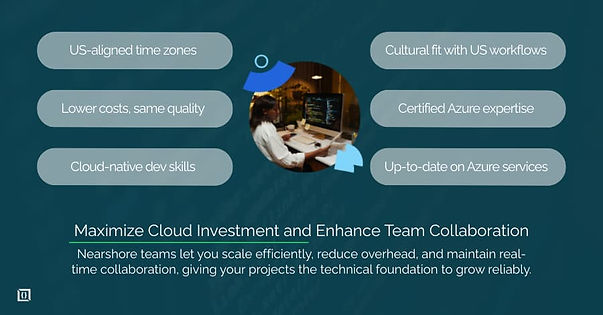
1. Time-zone alignment and cultural affinity
Latin American developers work during US business hours. A developer in Colombia starts their day on Eastern Time. Someone in Mexico City operates on Central Time.
Brazil sits one hour ahead of EST. This alignment means your Azure architect can join your 9am architecture review, your DevOps engineer can troubleshoot production issues at 2pm, and everyone wraps up around the same time.
Compare this to teams in India (10.5 hours ahead) or the Philippines (12 hours ahead). Offshore arrangements force someone to work odd hours. Either your US team stays late for meetings, or your offshore team works nights. This creates burnout and reduces collaboration quality.
Cultural affinity matters for cloud projects. Many Latin American developers have worked with US companies and understand how American businesses operate. They're familiar with agile methodologies, use standard tools like Jira and Slack, and communicate directly rather than through formal hierarchies. You spend less time explaining your processes and more time building.
2. Cost efficiency compared to on-shore hiring
A senior Azure developer in the US costs $120,000-$180,000 annually according to 2024 Stack Overflow and Glassdoor data. The same experience level in Latin America typically ranges from $50,000-$80,000. That's a 50-60% reduction in salary costs alone.
These savings scale with team size. A three-person Azure team costs roughly $450,000 annually in the US but around $200,000 in Latin America. That $250,000 difference extends runway for startups or frees budget for other business needs.
Cost efficiency doesn't mean compromised quality. You're hiring experienced engineers who hold Microsoft certifications and have built production Azure environments. The lower cost reflects regional economic differences, not skill differences.
3. Access to certified Azure expertise
Latin America produces significant Azure talent. Countries like Mexico, Colombia, Argentina, and Brazil have strong technical education systems and active Microsoft partner ecosystems. Universities teach cloud computing as standard curriculum, and coding bootcamps focus heavily on cloud platforms.
Look for developers with Azure Developer Associate (AZ-204), Solutions Architect Expert (AZ-305), or DevOps Engineer Expert (AZ-400) credentials. These certifications require passing rigorous exams that test both theoretical knowledge and practical experience.
The Latin American tech community stays current with Azure services. Developers attend conferences, participate in online communities, and continuously learn new services as Microsoft releases them. You get engineers who know not just the basics, but recent additions like Azure Container Apps, Static Web Apps, and AI services.
Services Offered by Nearshore Azure Developers
Azure developers handle the full spectrum of cloud work. Understanding what services you need helps you hire the right expertise level and background.
1. Azure Cloud Architecture & Design
Architecture decisions made early affect your application for years. Nearshore Azure architects design systems that balance performance, security, scalability, and cost. They choose appropriate services for your use case, plan network topology, implement identity and access management, and establish monitoring strategies.
Good architecture prevents expensive problems. An architect who understands your business requirements can design solutions that scale efficiently without over-provisioning resources. They implement security at the infrastructure level rather than bolting it on later.
They set up proper resource organization using management groups, subscriptions, and resource groups that align with your company structure.
2. Azure Application Development
Application development on Azure goes beyond writing code. Developers build cloud-native applications using services like Azure App Service, Azure Functions, and Azure Kubernetes Service. They implement serverless architectures that reduce operational overhead and scale automatically with demand.
Full-stack Azure development typically involves .NET, Node.js, or Python backends integrated with Azure services. Developers implement authentication using Azure AD, store data in Azure SQL or Cosmos DB, handle file storage with Azure Blob Storage, and manage application configuration through Azure App Configuration.
They understand how to build applications that take advantage of Azure's platform capabilities rather than just hosting traditional applications in the cloud.
3. Azure Migration & Integration Services
Moving existing systems to Azure requires planning and expertise. Migration projects fall into several categories: lift-and-shift moves existing applications to Azure VMs with minimal changes, refactoring modernizes applications to use Platform-as-a-Service offerings, and rebuilding creates new cloud-native versions.
Nearshore teams assess your current infrastructure, identify dependencies, plan migration phases, and execute the move with minimal downtime. They handle data migration using Azure Database Migration Service or Azure Data Box for large datasets.
They also integrate Azure services with existing on-premises systems, implementing hybrid cloud scenarios using Azure Arc or ExpressRoute connections.
4. Azure DevOps & CI/CD Implementation
Modern development requires automation. Azure DevOps engineers implement continuous integration and continuous deployment pipelines that build, test, and deploy code automatically. They configure Azure Pipelines or GitHub Actions to run tests on every commit, deploy to staging environments automatically, and push to production with approval gates.
Infrastructure as code becomes essential at scale. Teams use Terraform, ARM templates, or Bicep to define infrastructure in version-controlled files. This approach ensures consistency across environments, enables quick disaster recovery, and documents infrastructure decisions.
DevOps engineers also implement monitoring using Azure Monitor, set up alerts for critical issues, and create dashboards that show system health.
5. Azure Managed Services & Support
Production systems need ongoing maintenance. Managed service teams handle continuous monitoring, security updates, performance optimization, and incident response. They watch for cost anomalies using Azure Cost Management, implement security recommendations from Azure Security Center, and keep systems patched and updated.
This ongoing support prevents small issues from becoming major problems. A managed service team notices when resource utilization trends upward and can scale infrastructure before performance degrades. They respond to security alerts immediately rather than waiting for regular business hours. They also handle routine tasks like certificate renewals, backup verification, and capacity planning.
6. Data Engineering & AI/ML on Azure
Data workloads need specialized expertise. Azure data engineers build pipelines that ingest data from multiple sources, transform it for analysis, and load it into data warehouses or data lakes. They use services like Azure Data Factory for orchestration, Azure Databricks for processing, and Azure Synapse Analytics for data warehousing.
Machine learning projects require understanding both data science and Azure ML services. Engineers implement ML models in production using Azure Machine Learning, set up automated retraining pipelines, deploy models as APIs using Azure Container Instances or AKS, and monitor model performance over time. They also integrate pre-built AI services like Cognitive Services for vision, speech, or language processing tasks.
Engagement Models to Scale Your Team
Different projects need different engagement structures. Choose the model that matches your current needs and internal capabilities.
1. Dedicated Development Team
Dedicated teams work exclusively on your projects. You get a team of Azure developers, architects, and DevOps engineers who learn your business, understand your codebase, and function like an extension of your internal team. This model works well for ongoing product development where you need consistent velocity and deep product knowledge.
Teams typically include a mix of seniority levels: senior developers for architecture decisions, mid-level developers for feature implementation, and junior developers for routine tasks. You maintain control over priorities and sprint planning while the team handles execution.
2. Staff Augmentation
Staff augmentation adds specific skills to your existing team. You have an internal lead or architect but need additional Azure developers to increase capacity. The augmented developers join your team's standups, use your tools and processes, and work alongside your internal engineers.
This model offers flexibility. You can scale up when you need extra capacity for a major release, then scale down afterward. You control technical direction while the augmented staff executes under your guidance. Response time matters less than with dedicated teams since your internal team provides continuity.
3. Project-based Delivery
Fixed-scope projects benefit from project-based delivery. You define requirements, agree on deliverables and timeline, and the nearshore team handles implementation end-to-end. This works well for bounded initiatives like migrating a specific application to Azure, implementing a new feature, or building an MVP.
Project-based work requires clear requirements upfront. The more precisely you define the scope, the more accurate the estimates and timeline. The nearshore team provides regular updates but handles day-to-day decisions independently. You get predictable costs and delivery dates without managing the team directly.
4. Virtual CTO/Consulting Services
Early-stage companies or non-technical founders benefit from strategic guidance. Virtual CTO services provide experienced Azure architects who help plan your technical roadmap, evaluate technology choices, conduct cloud architecture audits, and establish development practices.
Consultants work part-time, typically a few hours per week or on-demand for specific decisions. They don't write code daily but guide your technical direction and help you avoid expensive mistakes. This works particularly well before hiring a full-time CTO or when your internal CTO needs specialized cloud expertise.
How to Hire a Nearshore Azure Developer
Hiring cloud talent requires evaluating both technical skills and collaboration abilities. A structured process helps you find developers who succeed in your environment.
Define your project scope and needs
Start by documenting what you're building or maintaining. Are you migrating an existing application? Building a new cloud-native product? Implementing DevOps automation? Each scenario needs different Azure expertise.
List required technical skills. If you're using specific Azure services like Azure Functions, Cosmos DB, or Azure Kubernetes Service, you need developers with experience in those areas. Identify your backend language (C#, Python, Node.js) since Azure developers typically specialize. Note any compliance requirements like HIPAA or SOC 2 that affect architecture decisions.
Estimate timeline and team size. A three-month MVP needs different staffing than ongoing product development. Consider whether you need full-time dedication or part-time availability. These parameters help candidates understand if the opportunity fits their situation.
Evaluate Azure certifications & experience
Microsoft certifications provide an objective measure of skill:
- Azure Developer Associate (AZ-204): Builds and deploys applications on Azure.
- Solutions Architect Expert (AZ-305): Designs complex Azure systems.
- DevOps Engineer Expert (AZ-400): Implements automation and CI/CD.
Verify certifications through Microsoft’s system or LinkedIn profiles. Don’t rely solely on resumes, since certification status can change.
Beyond certifications, review project experience. Ask candidates to describe projects they built on Azure: what services they used, challenges solved, and how they handled scaling or security. Specific examples reveal skills that certificates alone cannot.
Assess communication and collaboration skills
Technical ability matters less if a developer can’t communicate effectively. Test English proficiency in conversation. Can they explain concepts clearly, ask clarifying questions, and discuss tradeoffs between approaches?
Confirm availability during your required time zones. Some Latin American developers may prefer evening shifts, which might affect real-time collaboration.
Check familiarity with common tools like Slack, Zoom, Jira, and Git. Ask about agile experience, sprint planning, and code reviews - these form the backbone of distributed team workflows.
Onboarding and integration into your workflow
Effective onboarding accelerates productivity. Provide access to documentation, codebases, development environments, and Azure subscriptions from day one. Assign a buddy from your team to provide guidance and context.
Schedule regular check-ins during the first two weeks. Daily brief calls help catch confusion before it becomes blocked work. Review initial code submissions carefully and give detailed feedback on standards and preferences.
Set clear communication expectations. Define when they should ask questions versus work independently, preferred response times, and how to handle blockers. Explicit guidelines prevent common misunderstandings in remote work.
Common Use Cases
Understanding typical scenarios helps you identify where Azure developers add the most value to your organization.
Cloud-native application development
Cloud-native applications leverage Azure's platform services instead of just running traditional apps in VMs. Developers build applications using Azure App Service for web hosting, Azure Functions for event-driven processing, Azure Service Bus for messaging, and Azure Kubernetes Service for containerized workloads.
These applications scale automatically with demand, implement resilience patterns like circuit breakers and retry logic, and use managed services for databases and storage. Development teams focus on business logic rather than infrastructure management. Cloud-native architectures also reduce operational costs since you pay only for resources you actually use.
Legacy system migration to Azure
Many organizations run critical apps on older infrastructure. Azure developers migrate these systems to improve reliability, reduce maintenance, and enable modern practices.
Common targets include:
- Windows Server apps moved to Azure VMs or modernized as App Services.
- SQL Server databases migrated to Azure SQL Database.
- File servers replaced with Azure Files or Blob Storage.
Migration involves assessing current systems, mapping dependencies, testing in Azure staging environments, and phased cutover to minimize business disruption.
Data pipelines, analytics, and AI workloads
Data-driven companies need infrastructure for collecting, processing, and analyzing large datasets. Azure data engineers build pipelines using Azure Data Factory that extract data from various sources, transform it using Azure Databricks or Synapse, and load it into data warehouses for analysis.
Analytics teams use Azure Synapse Analytics for SQL-based analysis, Power BI for visualization, and Azure Machine Learning for predictive models. These pipelines run on schedules or trigger based on events, handling everything from customer behavior analysis to IoT sensor data processing.
DevOps automation and infrastructure as code
Manual infrastructure management doesn’t scale. Azure DevOps teams implement automation to provision infrastructure using code, deploy applications through pipelines, and monitor systems continuously.
Tools include:
- Terraform or Bicep for infrastructure definition.
- Azure Pipelines or GitHub Actions for CI/CD.
- Azure Monitor for observability.
Automation allows multiple daily deployments with confidence, automatic testing, consistent processes, and quick rollbacks when needed. Infrastructure as code also serves as documentation, showing exactly how systems are configured.
You can also reach out to our experts to get guidance on choosing the right framework and implementing it effectively for your projects.
Frequently Asked Questions
What is a nearshore Azure developer?
A nearshore Azure developer is a cloud engineer in a nearby country who specializes in Microsoft Azure. For US and Canadian companies, this typically means developers in Latin American countries like Mexico, Colombia, Brazil, or Argentina. These locations provide timezone alignment (within 1-3 hours) and cultural compatibility while offering cost advantages over domestic hiring.
How much does it cost to hire nearshore Azure developers?
Costs vary by experience level and location. Mid-level developers typically charge $40-60 per hour or $6,000-9,000 monthly for dedicated full-time work. Senior Azure architects range from $70-100 per hour or $10,000-12,000 monthly. Junior developers cost $25-40 per hour. These rates are 40-60% lower than equivalent US-based talent while maintaining comparable skill levels.
Are nearshore Azure developers certified?
Many nearshore developers hold Microsoft certifications. Common credentials include Azure Developer Associate (AZ-204), Solutions Architect Expert (AZ-305), and DevOps Engineer Expert (AZ-400). Always verify certifications through Microsoft's official credential verification system or the candidate's LinkedIn profile. Certifications confirm knowledge but should be evaluated alongside practical project experience.
How quickly can I onboard a nearshore Azure developer?
Onboarding timelines depend on engagement type and project complexity. Staff augmentation can ramp up in 1-2 weeks once you've selected a candidate. They join your existing processes and start contributing to well-defined tasks quickly. Dedicated teams or project-based delivery take 2-4 weeks as the team learns your business requirements, codebase, and architectural decisions. Complex projects requiring significant knowledge transfer extend this timeline.
What is the difference between offshore and nearshore Azure development?
Nearshore means working with teams in nearby timezones. For US companies, Latin America provides 0-3 hour time differences, enabling real-time collaboration during normal business hours. Offshore typically refers to Asia or distant parts of Europe with 8-12 hour differences. These time gaps create coordination challenges and slower feedback cycles. Nearshore also tends to offer stronger cultural alignment and English proficiency compared to many offshore locations.
What specific Azure certifications should I require for different project types?
Match certifications to your project needs. Application development projects benefit from Azure Developer Associate (AZ-204). Architecture and infrastructure projects need Solutions Architect Expert (AZ-305). DevOps automation requires Azure DevOps Engineer Expert (AZ-400). Data projects align with Azure Data Engineer Associate (DP-203) or Azure AI Engineer Associate (AI-102). Don't require every certification, focus on the one or two most relevant to your actual work.
How much does a nearshore Azure developer cost per hour/month by seniority level?
Junior developers (1-3 years experience) charge $25-40/hour or $4,000-6,000/month. Mid-level developers (3-6 years) cost $40-60/hour or $6,000-9,000/month. Senior developers and architects (6+ years) range from $70-100+/hour or $10,000-12,000+/month. Rates vary by country within Latin America, with Argentina and Brazil typically at the higher end and Colombia and Mexico somewhat lower.
How do I structure contracts and IP protection with nearshore Azure teams?
Use contracts that include clear intellectual property clauses specifying that all code and deliverables belong to your company. Include non-disclosure agreements for sensitive business information.
Work with agencies or contractors in countries with strong IP law enforcement, particularly those with trade agreements with the US. Store code in repositories you control rather than contractor-owned accounts. For particularly sensitive work, consult with legal counsel familiar with international contracts.
What's the typical ramp-up time for nearshore Azure developers by project type?
Staff augmentation ramps up fastest, typically 1-2 weeks for developers joining well-defined tasks in existing codebases. Project-based delivery takes 2-3 weeks including requirements review and architecture planning. Dedicated teams building new products need 3-4 weeks to understand business context, establish development processes, and begin productive work. Complex migrations or systems requiring deep domain knowledge extend these timelines.
Which nearshore countries have the strongest Azure talent pools and why?
Mexico, Colombia, Brazil, and Argentina lead Latin America in Azure expertise. Mexico benefits from geographic proximity to the US and strong technical education programs. Colombia has invested heavily in tech education through government initiatives and hosts numerous Microsoft partners. Brazil offers the largest talent pool due to population size and established tech industry.
Argentina produces highly educated developers from strong university programs. All four countries have minimal timezone differences with the US and growing populations of Microsoft-certified professionals.