Multi-Step AI Agents for Operations

Operations teams have long used automation to reduce repetitive tasks. Early approaches relied on scripts, then workflows, and later more configurable platforms. These systems improve efficiency, but they typically follow predefined sequences and need human oversight when conditions change.
Multi-step AI agents take a different approach. They receive an operational goal and work through the necessary steps to complete it, maintaining context and checking outcomes along the way. They adjust actions when results differ from expectations, helping processes continue without constant manual intervention.
Let’s look at what multi-step AI agents are, how they operate in real operations, and how they support continuous, reliable execution within operational workflows.
What Are Multi-Step AI Agents for Operations?
A multi-step AI agent for operations takes a business objective, breaks it into executable tasks, runs those tasks while checking results after each one, and continues until it completes the goal or determines it can't proceed. The agent maintains context throughout the process, remembers what it did, and uses that information to decide what comes next.
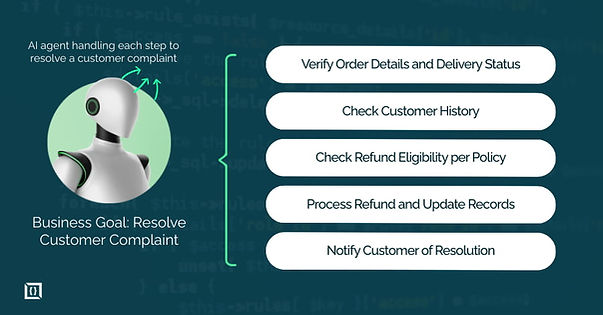
If you ask a traditional system to resolve a customer complaint, you need to tell it exactly what to do at each stage. An agent just needs the goal: resolve this complaint. It will check the order status, review the customer's history, determine if a refund applies based on policy, process that refund if appropriate, and send confirmation. Each step depends on the outcome of the prior one.
Why "Multi-Step" Matters in Operational AI
Single-step AI tools fail in operations because real work involves chains of dependent decisions. You can't reconcile an invoice without first matching it to a purchase order, verifying receipt of goods, and checking for pricing discrepancies.
Each step creates the context for the next one. If the PO numbers don't match, you need to investigate further. If pricing is off by more than a threshold, you might need approval before proceeding.
Operations involve decision trees, exception handling, and contextual judgment. A single-step system processes one input and produces one output. It can't manage the continuity required when step three depends on what happened in step one.
How They Differ from Single-Prompt AI Tools
Chatbots and copilots are response-oriented: you give a prompt, they reply, and the interaction ends. Multi-step agents are goal-oriented, completing a sequence of actions to achieve an objective.
For example, a copilot might help draft an email about a late shipment, while an agent will check the shipment status, confirm it’s overdue, retrieve vendor contact information, send the message, log the interaction, and schedule a follow-up. The copilot assists; the agent executes.
Feature | Single-Prompt AI (Chatbots/Copilots) | Multi-Step AI Agents |
Output | Text, code, or images | Completed business processes |
User Interaction | High (Requires constant prompting) | Low (Triggered by a goal or event) |
Logic | Pattern matching and prediction | Planning, reasoning, and tool use |
Connectivity | Usually isolated or limited plugins | Deep integration with ERP, CRM, and APIs |
How Multi-Step AI Agents Work
The architecture of a multi-step agent differs from traditional AI tools because it needs to maintain state, make sequential decisions, and interact with multiple systems while keeping track of where it is in a process.
Goal-Based Input vs Task-Based Input
Traditional automation requires task-based input. You specify each action: extract this field, check this condition, call this API, update this record. Agents accept goal-based input. You tell them to reduce the support ticket backlog below 100 by end of day or ensure all expense reports from last month are approved and processed.
The agent translates that goal into the specific tasks needed. It determines what information it needs, what systems to check, what decisions to make, and what actions to take. This matters because operations leaders shouldn't need to program logic trees. They should define outcomes.
Task Decomposition and Planning
When an agent receives a goal, it breaks that goal into a sequence of steps. For inventory replenishment, this might look like: check current stock levels, review sales velocity for the past 30 days, calculate days until stockout, check supplier lead times, determine optimal order quantity, verify budget availability, generate purchase order.
The agent doesn't just create a static plan and execute it. It builds an initial plan based on what it knows, then adjusts as it goes. If it finds that the supplier lead time increased from two weeks to four, it recalculates the order quantity and timing.
Sequential Execution and Decision-Making
Execution happens step by step, with the agent evaluating results after each action. It checks an inventory database and gets current stock levels. Based on those numbers and the sales data, it calculates you'll run out in 12 days. It queries the supplier system and finds the lead time is 15 days, which means you need to order immediately rather than waiting.
Each decision point uses the context from previous steps. The agent doesn't just follow a script. It evaluates conditions and chooses the appropriate path. If the budget check shows insufficient funds, it might flag the order for approval instead of placing it automatically.
Feedback Loops and Iteration
Agents validate their actions and retry when needed. After sending an API request to create a purchase order, the agent checks the response. If it receives an error about an invalid supplier code, it attempts to look up the correct code, updates the request, and tries again. If that fails, it logs the issue and escalates to a human.
This self-correction capability makes agents resilient. Traditional workflows fail when they hit an unexpected condition. Agents adapt within the constraints you define.
Memory, State Management, and Context Persistence
Throughout execution, the agent maintains memory of what it's done, what it's learned, and where it is in the process. This includes the data it collected, the decisions it made, and the outcomes of previous actions.
When handling a complex customer issue that requires checking order history, inventory status, and past support tickets, the agent holds all that context. By the time it reaches the resolution step, it knows the customer is high-value, has had two similar issues in the past month, and the inventory shows a pattern of defects from a specific batch. That accumulated context informs its final decision.
Core Components of a Multi-Step AI Agent
An agent is not a single large language model. It is an architecture of several modular components working together to ensure the output is accurate and safe.
- Planning Module: Structures the roadmap for execution.
- Reasoning Engine: Handles the "if/then" logic and prioritizes actions.
- Tool Orchestration: Connects the agent to your tech stack.
- Memory Systems: Stores context for the duration of the task.
- Guardrails: Ensures the agent stays within company policy.
Planning Module
The planning module takes a goal and creates an execution strategy. It determines what information is needed, what sequence of actions makes sense, and what dependencies exist between steps. This module considers the available tools, system constraints, and business rules when building a plan.
Reasoning and Decision Engine
At each step, the reasoning engine evaluates conditions and determines the next action. It applies logical rules, checks against policies, and makes judgment calls based on the current state. When reconciling transactions, it might determine that a $0.50 discrepancy doesn't require investigation but a $500 one does.
The engine handles conditional logic: if this condition is true, do this; otherwise do that. It prioritizes actions when multiple options exist and determines when to escalate versus when to proceed.
Tool and API Orchestration
Agents interact with real business systems through APIs and integrations. The orchestration layer manages these connections, handles authentication, formats requests correctly, and processes responses. An agent might need to query Salesforce for customer data, check inventory levels in an ERP system, and create a ticket in Jira, all within a single workflow.
This component ensures reliable integration with your existing infrastructure. It manages rate limits, handles errors from external systems, and maintains security protocols.
Short-Term and Long-Term Memory
Short-term memory holds the context for the current task. When processing an insurance claim, this includes the claim details, policyholder information, and the results of each verification step. This memory clears when the task completes.
Long-term memory persists across tasks. It stores patterns, learned behaviors, and historical context. If the agent has processed 1,000 similar claims, it can reference that experience when handling the 1,001st. It might know that claims from a specific region typically require additional documentation or that a certain type of damage usually costs more to repair than initial estimates suggest.
Validation, Error Handling, and Guardrails
Every action includes validation checks. After updating a record, the agent verifies the update succeeded. After calculating a value, it checks if the result falls within expected ranges. These validations catch errors before they propagate.
Error handling defines what happens when something goes wrong. Does the agent retry? Does it try an alternative approach? Does it escalate to a human? Guardrails set boundaries on what the agent can do. You might allow it to approve refunds up to $100 automatically but require human approval above that threshold.
Multi-Step AI Agents vs Traditional Automation
The difference between these two is often described as "scripts vs. brains." While traditional automation is still valuable for 100% predictable tasks, it struggles with the messiness of real-world operations.
Aspect | Rule-Based Workflows | AI Workflows | Multi-Step AI Agents |
Path determination | Fixed, predefined | Fixed with AI steps | Dynamic, adaptive |
Decision making | If-then rules only | Limited to specific AI calls | Continuous, context-aware |
Error handling | Stops on exceptions | Stops or follows preset paths | Attempts resolution, escalates when needed |
Setup complexity | High (map all paths) | High (script with AI) | Moderate (define goals and guardrails) |
Rule-Based Workflows vs Agentic Systems
Rule-based automation works when processes are stable and exceptions are rare. You map out every scenario, define the logic for each one, and the system follows those rules exactly. When a customer requests a return, the workflow checks if it's within the return window, if the item is returnable, if the customer has exceeded return limits, and processes accordingly.
This breaks down when you encounter a scenario you didn't anticipate. A customer bought an item as a gift, it arrived damaged, they're outside the return window but have photos proving the damage existed on delivery. Your rule-based system doesn't have a path for this, so it fails or forces a human to handle it.
An agent evaluates the situation based on the goal of fair customer treatment and company policy. It checks the photos, verifies the delivery date, reviews the customer's history, and determines an appropriate resolution even though this exact scenario wasn't programmed.
AI Workflows vs Autonomous Agents
AI workflows incorporate AI at specific steps but still follow a predetermined sequence. You might use AI to classify a support ticket, then route it through a fixed set of steps based on that classification. The AI enhances individual steps, but the overall path is scripted.
Agents choose their own path. After classifying a ticket, an agent determines what information it needs, where to find that information, what resolution makes sense, and how to implement it. The sequence of actions emerges from the goal and context rather than from a predefined workflow diagram.
Human-in-the-Loop vs Fully Autonomous Execution
Autonomy exists on a spectrum. Some agents operate fully autonomously within defined boundaries. They handle routine tasks from start to finish without human involvement. Others include checkpoints where a human must review and approve before the agent proceeds.
The right level of autonomy depends on risk, compliance requirements, and business criticality. Financial reconciliation might run autonomously for transactions under $10,000 but require approval above that. Customer refunds might be fully automated for clear-cut cases but escalate edge cases to support managers.
Operational Use Cases by Business Function
The real value of multi-step agents comes from their ability to handle cross-functional work - tasks that involve multiple departments and systems.
1. Customer Support and Service Operations
An agent handles a product complaint by pulling up the customer's order, checking the product's known issues, determining if a replacement or refund is appropriate based on policy and circumstances, processing that resolution, updating the CRM, and sending confirmation to the customer.
It might identify that multiple customers reported the same issue with a specific product batch and flag that pattern for investigation.
2. Retail and E-commerce Operations
Pricing optimization agents monitor competitor pricing, check inventory levels, evaluate sales velocity, and adjust prices within defined parameters to optimize for margin and turnover.
An inventory management agent tracks stock across multiple warehouses, forecasts demand based on historical data and upcoming promotions, calculates optimal stock levels, and generates replenishment orders when thresholds are reached.
3. Supply Chain and Inventory Management
When a shipment is delayed, an agent checks the impact on dependent orders, evaluates alternative suppliers or shipping methods, calculates cost implications, determines if customer notifications are needed, and executes the optimal response. It manages the exception handling that traditionally requires supply chain managers to make judgment calls.
4. Finance, Accounting, and Compliance
Three-way matching agents reconcile purchase orders, receipts, and invoices automatically. They identify discrepancies, determine if those discrepancies fall within acceptable tolerances, flag items requiring investigation, and route exceptions appropriately.
Month-end close agents verify that all transactions are recorded, accounts reconcile, and required reports are generated, escalating any gaps they find.
5. IT Operations and DevOps
Incident response agents detect anomalies, gather relevant logs and metrics, determine probable causes, attempt automated remediation steps, and escalate to on-call engineers if remediation fails.
They document everything they tried and what they found, giving engineers the context they need to take over.
6. Marketing and Revenue Operations
Campaign operations agents set up campaigns across multiple channels, verify tracking is properly configured, monitor performance against benchmarks, and adjust budgets or targeting based on results.
Revenue operations agents ensure data flows correctly between marketing, sales, and finance systems, reconciling records and flagging data quality issues.
Multi-Step AI Agent Workflows
These examples show how agents handle complete operational processes.
End-to-End Ticket Resolution Agent
A customer submits a ticket reporting a missing order. The agent retrieves order and tracking details, verifies the delivery status, and identifies that the package may have been delivered to the wrong unit.
It checks company policy, confirms stock availability, creates a replacement order with signature-required delivery, updates the ticket with resolution details and tracking information, and notifies the customer via email. The workflow completes without human intervention, while exceptions can be escalated if necessary.
Autonomous Inventory Replenishment Agent
The agent monitors inventory levels daily. For a given SKU, it identifies potential stockouts by comparing current stock, sales rate, and supplier lead time.
It calculates the optimal order quantity considering historical demand, storage constraints, and budget availability. The purchase order is generated, sent to the supplier, logged in the ERP system, and the inventory forecast updated. The agent sets reminders to track shipment progress and adjusts future actions if stock levels change unexpectedly.
Financial Reconciliation and Reporting Agent
At month-end, the agent reconciles bank statements with the general ledger. Exact matches are automatically marked as reconciled.
For unmatched transactions, it applies logic to handle timing differences, duplicates, or missing entries. Small discrepancies are auto-posted with standard codes, while larger items are flagged for human review. A reconciliation report is generated, showing matched items, exceptions, and current status, reducing manual effort while keeping oversight for critical cases.
Benefits of Using Multi-Step AI Agents for Operations
Multi-step AI agents improve operational outcomes by increasing speed, accuracy, and scalability across routine processes.
Benefit | Impact |
Efficiency & Cost | Automates high-volume tasks, reduces labor costs |
Scalability | Handles larger workloads without extra staff |
Faster Execution | Speeds detection and response |
Reduced Errors | Minimizes mistakes in repetitive work |
Operational Efficiency and Cost Reduction
Agents handle high-volume repetitive processes at machine speed. A support agent that resolves 40% of tickets automatically saves your team from handling hundreds or thousands of tickets per month. If your average ticket costs $15 in labor to resolve, and you handle 10,000 tickets monthly, automating 40% saves $60,000 per month.
The efficiency gain isn't just speed. It's consistency. The agent applies the same logic and policies every time. It doesn't get tired, distracted, or forget steps.
Scalability Without Linear Headcount Growth
When order volume doubles, traditional operations need to double headcount or accept slower processing. Agents scale with volume. An inventory agent manages 1,000 SKUs or 10,000 SKUs with the same resources. A financial reconciliation agent handles $10 million in monthly transactions or $100 million.
This matters during peak periods. Retail operations can handle holiday volume spikes without hiring seasonal staff for routine tasks. Support teams can manage increased ticket volume without extending response times.
Faster Decision-Making and Execution
The time between identifying an issue and taking action compresses dramatically. When a supplier shipment is delayed, an agent detects it, evaluates the impact, and implements mitigation within minutes. A human operations manager might not notice the delay until hours later, then need time to research options and execute a solution.
Faster execution leads to better outcomes. You catch inventory issues before stockouts occur. You resolve customer complaints before they escalate. You identify fraud patterns while you can still prevent losses.
Reduced Human Error in Repetitive Processes
Manual data entry, copy-paste operations, and routine calculations introduce errors. An agent performing the same task doesn't make typos, doesn't transpose numbers, and doesn't skip steps because it's Friday afternoon.
This is particularly valuable in processes where errors have significant consequences. Financial reconciliation errors create audit issues. Inventory errors lead to stockouts or overstock. Compliance errors result in fines or legal problems.
Risks, Limitations, and Challenges
No technology is a complete solution. Engineers and ops leaders must be aware of the potential issues when deploying autonomous systems.
Hallucinations and Incorrect Decision Paths
Language models can generate plausible but incorrect information. In operational contexts, this might mean an agent creates a response to a customer that sounds reasonable but contains factual errors about your policies. It might make a calculation that looks right but uses flawed logic.
Mitigation requires validation layers. Verify facts against authoritative sources. Check calculations using deterministic code. Implement approval thresholds for high-stakes decisions. Monitor agent outputs systematically rather than assuming correctness.
Data Quality and System Dependency
Agents operate on the data in your systems. If your inventory database has incorrect stock levels, the agent will make wrong decisions. If your CRM has outdated customer information, the agent will work with bad context.
You need clean, accurate, accessible data for agents to function reliably. This often means addressing data quality issues you've been deferring. You also become dependent on system availability. If your ERP goes down, agents that depend on it can't operate.
Governance, Security, and Compliance Risks
An agent with access to multiple systems needs appropriate permissions and audit trails. You need to track what actions agents take, why they took them, and what data they accessed. This becomes critical for compliance in regulated industries.
Security risks include agents making API calls that expose sensitive data, agents being manipulated through prompt injection attacks, and agents exceeding their intended scope of authority. Robust access controls, logging, and guardrails are not optional.
Over-Automation and Loss of Human Oversight
Automating too much too fast leaves you with systems that operate outside human understanding and control. You need humans who understand what agents are doing, can audit their decisions, and can intervene when needed.
Over-automation also creates fragility. When an agent handles a process end-to-end and no human understands the details anymore, you're vulnerable if that agent fails or if the process needs to change.
Best Practices for Implementing Multi-Step AI Agents
Taking a phased approach is usually the best way to bring agents into your operations.
Start with Well-Defined Operational Goals
Don't start by asking what agents can do. Start by identifying operational problems you need to solve. Where do you have backlogs? Where are errors costing you money? Where does work sit waiting for someone to process it?
Pick processes with clear success criteria, sufficient volume to justify automation, and well-documented business rules. Your first agent should deliver measurable value within weeks, not months.
Choose the Right Level of Autonomy
Phase deployment based on risk and confidence. Start with human-in-the-loop for approvals. Let the agent prepare everything but have a human click "confirm" before execution. Monitor performance and outcomes.
As confidence builds, increase autonomy for routine cases while keeping human oversight for edge cases. An expense approval agent might auto-approve clear-cut expenses under policy limits but escalate anything with missing receipts or unusual patterns.
Implement Guardrails and Validation Layers
Define clear boundaries for agent behavior. Set spending limits. Require verification for data modifications. Implement reasonability checks on calculations. Create escalation rules for scenarios the agent shouldn't handle autonomously.
Every agent action should include validation. After updating a record, verify the update succeeded. After calculating a value, check if it falls within expected ranges. After sending a message, confirm delivery.
Monitor, Audit, and Continuously Improve Agents
Track agent performance metrics: success rates, error rates, escalation rates, processing times. Review agent decisions regularly to identify patterns in errors or edge cases.
Use these insights to refine agent logic, update guardrails, and expand capabilities. Agents are operational assets that require ongoing management, not set-and-forget systems.
Multi-Step AI Agents and the Future of Operations
We are moving away from an era where humans act as the "glue" between disconnected software systems. In the near future, software will not just store data; it will actively manage the flow of work.
From Automation to Autonomous Operations
The shift isn't happening overnight. Organizations are moving incrementally from rigid automation to flexible agents that handle progressively more complex decisions. Early adopters are seeing what's possible. Mainstream adoption will accelerate as platforms mature and best practices emerge.
This evolution changes how operations teams think about their work. Instead of executing processes, they design and oversee systems that execute processes.
Agentic Workflows as a Competitive Advantage
Organizations that master agent deployment will operate faster and more efficiently than competitors still relying on manual processes or rigid automation. The advantage comes not from having the technology but from identifying the right processes to automate and implementing agents effectively.
Speed and accuracy in operations translate directly to customer experience, cost structure, and market responsiveness.
How Multi-Step Agents Enable AI-First Organizations
AI-first organizations design operations around what agents can do rather than retrofitting agents into existing human-centric processes. They build systems where agents handle routine execution while humans focus on exceptions, strategy, and judgment calls that require nuanced understanding.
This requires new operational patterns, new skill sets, and new ways of measuring performance. The transition takes time, but the organizations making it are establishing advantages that will compound over years.
Your Next Move
Before deploying agents, identify the processes where sequential decision-making adds the most value. Start with clear operational goals, roll out agents in stages, monitor outcomes, and adjust rules or oversight as needed.
Over time, they handle routine tasks reliably, reduce errors, and free your team to focus on higher-value decisions.
You can also connect with us to explore how multi-step AI agents can streamline operations, reduce errors, and scale processes without increasing manual workload.
Frequently Asked Questions
What is a multi-step AI agent for operations?
It’s an autonomous system that takes a business goal, breaks it into a series of tasks, executes them step by step, evaluates the results at each stage, and adjusts actions as needed until the objective is completed.
How are multi-step AI agents different from chatbots?
Chatbots respond to a single prompt. Multi-step agents work toward a goal, making decisions, interacting with systems, and validating outcomes across multiple steps to complete an entire operational process.
What does “multi-step” mean in operational AI?
It means the agent performs a chain of dependent actions where each step influences the next. The agent monitors results along the way and decides how to proceed instead of following a fixed script.
What business operations can multi-step AI agents automate?
They can handle end-to-end processes such as customer support workflows, inventory management, financial reconciliation, IT incident response, and compliance checks - essentially any workflow that requires sequential decision-making across systems.
Are multi-step AI agents fully autonomous?
Autonomy is flexible. Some agents operate with human oversight, approvals, or checkpoints, while others can act independently for low-risk processes. The right level depends on risk, compliance, and operational requirements.
How do multi-step AI agents make decisions?
They combine predefined rules, operational logic, real-time data, and system feedback to select the next action based on the outcomes of previous steps. This ensures decisions are consistent and aligned with business objectives.
What tools can multi-step AI agents use?
Agents can access and interact with systems like CRMs, ERPs, ticketing platforms, databases, analytics tools, and internal applications, depending on integration and permission settings.
How do multi-step AI agents handle errors or failures?
They detect issues through validation, retry or adjust actions when appropriate, escalate exceptions, or stop execution according to predefined rules and safety constraints, ensuring reliability and oversight.
Are multi-step AI agents the same as AI workflows?
No. Workflows follow a fixed sequence of steps. Multi-step agents dynamically decide what to do next based on context, results, and changing conditions, adapting to exceptions without human intervention.
What are the main benefits of using multi-step AI agents in operations?
They reduce operational costs, accelerate execution, improve scalability, minimize human error, and maintain continuity across processes without constant manual oversight.