Claude Cowork: Why It’s Changing the Way We Work

On January 12, 2026, Anthropic released Claude Cowork as a research preview for Max plan subscribers. The tool builds on Claude Code's architecture but targets non-technical users who need file management, document creation, and workflow automation without touching a terminal.
You grant Claude access to a folder, describe what you want done, and it handles the execution autonomously.
Let's break down what Cowork actually does, how early users are responding, what risks you should know about, and where it fits in the growing ecosystem of agentic AI tools.
What Is Claude Cowork?
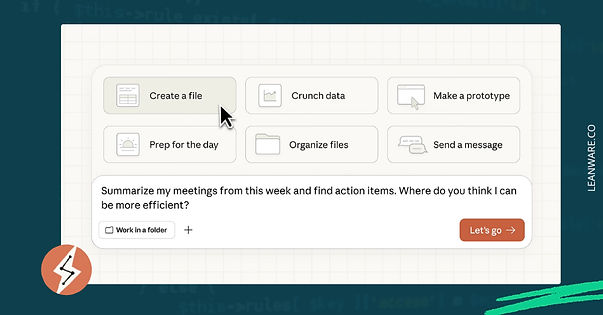
Claude Cowork works differently from standard AI chat. Instead of responding to prompts one at a time, it functions as an autonomous agent that can plan, execute, and complete multi-step tasks with minimal supervision.
Anthropic released Cowork on January 12, 2026 as a research preview, available through the Claude Desktop app on macOS for Max plan subscribers. The tool grants Claude access to a designated folder on your computer, where it can read, edit, organize, and create files based on natural language instructions.
The difference from standard chat is simple. Instead of copy-pasting content back and forth, you describe an outcome, and Cowork handles the execution. Tasks that previously required constant back-and-forth now run in the background while you focus on other work.
The Evolution From Chatbots to AI Colleagues
AI tools have changed over time. Early chatbots handled simple queries. ChatGPT and Claude brought sophisticated language understanding to consumers. Now we are entering what many call the "agentic era," where AI systems move from passive responders to active participants in digital work.
Cowork embodies this transition. It does not just generate text; it takes actions. The system can organize hundreds of files, extract data from screenshots into spreadsheets, or draft reports from scattered notes across multiple documents.
Agency vs. Chat
Standard AI chat operates on a simple loop: you provide input, the model generates output, you evaluate and iterate. Each exchange is discrete.
Agentic systems like Cowork break this pattern. When you assign a task, Claude formulates a plan, breaks complex work into subtasks, executes steps in parallel, and checks its own work.
According to Anthropic, Cowork coordinates multiple sub-agents working simultaneously on complex tasks. You can queue several jobs and let Claude process them in parallel. The experience shifts from dialogue to delegation.
How Claude Cowork Fits Into Anthropic's Ecosystem
Cowork builds directly on Claude Code, Anthropic's command-line coding assistant that launched in November 2024. Claude Code proved popular with developers, but Anthropic noticed something interesting: users were forcing the coding tool to perform non-coding tasks.
Boris Cherny, who leads Claude Code at Anthropic, noted that users deployed it for vacation research, building slide decks, cleaning up email, canceling subscriptions, recovering wedding photos, and even controlling ovens. Cowork was developed to serve these broader use cases without requiring terminal familiarity.
The tool runs on the Claude Agent SDK, sharing the same foundation as Claude Code. It integrates with existing connectors linking Claude to external services and includes skills for creating professional documents, presentations, and spreadsheets.
Claude Cowork Launch: Initial Reactions and Early Buzz
First Impressions: "Claude Code for the Rest of Us"
The phrase that caught on quickly was "Claude Code for non-coders." Simon Willison, a prominent developer, captured the sentiment: "This is a general agent that looks well positioned to bring the wildly powerful capabilities of Claude Code to a wider audience."
Cowork sits as a tab in the Claude Desktop app, accessible without terminal knowledge or virtual environment setup. You select a folder, describe what you want done, and watch Claude work.
Lenny Rachitsky, host of Lenny's Podcast, reported using Cowork to analyze 320 podcast transcripts and extract key themes. The task completed successfully without requiring technical expertise.
Real Stories from Day One Users
Cowork wraps Claude Code in a macOS app, exposing Steps, Artifacts, Context, and filesystem access. It handles tasks like documents, presentations, and research briefs better than standard chat, using structured steps and clarifying questions.
The UI exposes internal files and scripts, connectors can fail, and some local operations are inconsistent. Approval prompts are frequent, and starter tasks are limited.
Claire Vo, founder of ChatPRD, offered a measured assessment: the outputs were acceptable but the tool exposes too much internal process for non-technical users while limiting flexibility for advanced ones. Despite these critiques, she noted Cowork produced better results than standard chat.
Perhaps the most striking detail: Anthropic built Cowork in approximately a week and a half, using Claude Code itself. Felix Rieseberg of Anthropic's technical staff confirmed the team built the feature the same way they want users to work with Claude: describing needs, letting Claude handle implementation, and steering along the way.
Cowork works when instructions are clear, but the interface still sits between a non-technical wrapper and the full Claude Code terminal experience.
Core Capabilities of Claude Cowork
Smart File Organization: Cowork sorts and renames files based on content and context. Point it at a cluttered downloads folder with vague filenames, and it categorizes items by type, project, or date. The system reads file contents to make informed decisions about organization rather than relying solely on metadata.
Document Creation: The tool includes skills for generating PowerPoint, Excel, and Word files with proper formatting. Give Cowork rough notes or a meeting transcript, and it produces documents with consistent styling and working structures.
Batch Processing: Handle format conversions, image resizing, and bulk operations efficiently. Convert, crop, compress, or rename hundreds of files through natural language instruction. For teams dealing with media assets, this replaces manual processing or dedicated automation software.
Analytics Extraction: Cowork reads CSV files, extracts data from documents, and generates summary reports. The system creates properly formatted Excel files with working formulas, addressing a common frustration with AI tools that generate tabular data requiring cleanup.
Multi-Tasking: The system runs in a virtual machine environment, processing multiple tasks simultaneously. You can queue several jobs without waiting for each to complete. Progress indicators surface Claude's reasoning so you can follow along or intervene if needed.
Extending With Skills and APIs: Anthropic provides a skills framework improving Claude's ability to work with specific file formats. The system ships with skills for docx, xlsx, pptx, and PDF files. Connectors link Claude to external services like Google Drive and Gmail.
Is Claude Cowork Included With Your Plan?
Cowork is available only to Claude Max subscribers during the research preview:
Plan | Monthly Cost | Usage Compared to Pro |
Max 5x | $100 | 5 times Pro usage |
Max 20x | $200 | 20 times Pro usage |
Pro plan subscribers ($20/month) and free tier users cannot access Cowork at this time. A waitlist exists for users on other plans.
Anthropic positioned Cowork as a research preview, meaning it will evolve based on user feedback. The roadmap includes cross-device sync and Windows support, though no specific timeline has been announced.
Currently, Cowork runs only on macOS, which limits its availability for some users.
How Claude Cowork Works?

Cowork combines controlled file access, optional browser automation, and task-specific workflows to carry out complex jobs with minimal supervision.
Granting Folder and App Access
You start by selecting a specific folder on your computer that Claude can access. The system operates within that boundary and cannot read or modify files outside the designated location.
This sandbox approach provides security benefits while enabling meaningful automation.
Browser Control
When connected to Claude in Chrome, Cowork navigates websites, fills forms, clicks buttons, and extracts information. Anthropic recommends limiting browser access to trusted sites. Web content represents a primary vector for prompt injection attacks, where malicious instructions hidden in pages could influence Claude's behavior.
Example: Organizing Receipts to Spreadsheet
A practical workflow: drop receipt images into a folder, point Cowork at it, and request an expense spreadsheet. The system reads receipt contents, extracts relevant data (vendor, amount, date, category), and generates an Excel file with working formulas for totals and summaries.
Real-World Use Cases
Cowork supports office productivity, content creation, data analysis, and creative workflows by automating routine tasks in each area.
- Office Productivity: Document organization, report drafting, email processing, and calendar coordination. Knowledge workers dealing with high document volumes benefit most directly.
- Content Creation: Marketing teams use Cowork for asset preparation, content repurposing, and campaign organization. When integrated with browser control, it can research competitors and prepare reports.
- Data Analysis: Read various data formats and produce structured outputs. Identify trends, flag outliers, and generate visualizations accessible to teams without dedicated analysts.
- Creative Workflows: Designers and editors benefit from batch processing capabilities. Convert formats, apply consistent naming, and organize project assets through the natural language interface.
Risks, Safety, and Best Practices
Cowork can handle a lot of work on its own, but it’s important to manage which files it can access, keep backups, and check its work to avoid mistakes.
Why You Should Avoid Sensitive Data
Anthropic explicitly warns against granting Cowork access to folders containing financial documents, credentials, or personal data. The tool can read, modify, and permanently delete files within its access scope.
Prompt Injection Hazards
Prompt injection attacks attempt to manipulate AI behavior through malicious instructions embedded in content the AI processes. Anthropic has implemented defenses, including model training to recognize and refuse malicious instructions and content classifiers scanning for potential injections.
However, the company acknowledges these measures do not eliminate all risk.
How Anthropic Mitigates Risks
The architecture includes several safety layers: reinforcement learning teaching Claude to recognize malicious instructions, content classifiers scanning untrusted content, filesystem sandbox isolation via Apple's Virtualization Framework, and summarization filtering as a protection layer.
Lessons from Early Users
Early users treat Cowork as a capable but imperfect tool. Best practices include testing workflows on sample data first, keeping backups of critical files, and giving explicit, unambiguous instructions to reduce errors.
Alternatives and the Agentic AI Landscape
There are a few different agentic AI tools out there, each with their own strengths. Cowork stands out for working directly with local files and giving clear boundaries on what it can access.
ChatGPT Agents
OpenAI's ChatGPT agent mode combines Operator's browser automation with deep research capabilities. The system navigates websites, runs code, conducts analysis, and delivers editable documents. Pro users get 400 messages monthly; other paid tiers receive 40 messages.
The key difference: ChatGPT agent emphasizes browser-based tasks and web research, while Cowork focuses on local file manipulation and document creation.
Google's Project Mariner
Project Mariner, powered by Gemini 2.0, operates as a Chrome extension automating web tasks. It achieved 83.5% success rate on the WebVoyager benchmark, handling multi-step workflows like booking reservations. Available to Google AI Ultra subscribers ($249.99/month) in the US.
What Makes Cowork Unique
Cowork is built on Claude Code, so it inherits a stable execution model for real workflows. Its folder-based permission system defines exactly what the AI can access, which helps contain risk. The approach to transparency around limitations and potential errors makes it easier to integrate into actual work without unexpected behavior.
The Future of Work With AI Coworkers
With AI taking over routine tasks, humans are moving into roles where we guide, review, and decide how work gets done, changing the way knowledge work looks day to day.
Shifting Roles Toward Strategy
With agentic AI handling execution, humans are moving from performing routine tasks to guiding and reviewing work.
The focus shifts toward deciding what needs to be done and evaluating outcomes, with knowledge workers acting more as supervisors of AI systems than as direct doers.
Predictions for 2026 and Beyond
The World Economic Forum estimates that between 2025 and 2030, about 170 million new roles will be created while 92 million are displaced, resulting in a net increase of 78 million jobs. Around 40% of employers plan to hire specifically for AI-related roles, while a similar share expects workforce reductions in areas where AI automates tasks. Analysts from
TechCrunch-backed surveys see 2026 as the year AI begins moving from boosting productivity to automating work directly.
AI adoption will shift workflows and skill requirements, creating new roles focused on supervising and integrating AI while some routine positions are reduced.
The Job Displacement Debate
Goldman Sachs Research estimates 6-7% of US employment faces displacement risk with wide AI adoption, though impacts are expected to be transitory as new roles emerge. The team notes predictions that technology will reduce human labor needs have "a long history but a poor track record."
Workforce shifts are likely to be gradual and uneven, with new roles emerging alongside displaced ones.
Why Claude Cowork Is Trending
Claude Cowork arrives as the AI industry transitions from conversation to action. The tool demonstrates that agentic capabilities, previously accessible only to developers comfortable with command-line tools, can work for mainstream knowledge workers.
For individual users, Cowork offers a workflow where routine tasks happen in the background. For the industry, it represents another step toward AI systems working alongside humans as genuine collaborators rather than sophisticated question-answering machines. The research preview status means early adopters are shaping a product that could define how non-technical users interact with agentic AI for years to come.
Your Next Step
Claude Cowork is still a research preview with clear limitations: macOS only, Max plan required, and risks around file deletion and prompt injection. Its Claude Code foundation, however, is proven for real workflows.
Start small: use test folders, keep backups, and give precise instructions. Cowork handles specificity well but struggles with ambiguity.
The bigger picture is the trend: agentic AI is moving from developer tools to general productivity. Cowork, ChatGPT agent, and Project Mariner all point toward AI that executes tasks, not just suggests them. How you approach that shift will shape whether these tools simplify or complicate your work.
You can also connect with us at Leanware for building agentic AI applications and Claude-powered automation tools to streamline your team's workflows.
Frequently Asked Questions
Is Claude Cowork Safe for Business Use?
Cowork runs in a sandboxed environment with folder-level permissions. For production workflows, it’s best to start with test data, maintain backups, and avoid giving it access to sensitive information.
Which Devices and Plans Support Claude Cowork?
Currently, Cowork is available on macOS only and requires a Claude Max subscription ($100 or $200 per month). Other platforms are not yet supported, and no release schedule has been announced.
Can Claude Cowork Access Anything Without Permission?
No. Claude can only access folders you explicitly designate. It cannot read or modify files outside those boundaries.
What Happens If Claude Makes a Mistake?
Mistakes are possible, especially if instructions are unclear. Cowork prompts for confirmation on potentially destructive actions, but users should keep backups and review outputs for accuracy.
How Much Does It Cost in Tokens/Usage?
Cowork consumes more usage than standard Claude chat. To optimize, batch similar tasks into single sessions and reserve regular chat for simpler interactions.