Enterprise Knowledge AI Assistants: Features and Benefits

Every organization accumulates knowledge. It lives in wikis, Slack threads, support tickets, Google Docs, Confluence pages, and the heads of employees who've been around long enough to know where things are. The problem is finding it when you need it.
According to McKinsey, knowledge workers spend about 20% of their time, roughly one day per week, searching for and gathering information. Enterprise Knowledge AI Assistants address this by leveraging large language models and semantic search to surface answers from your internal data.
Let’s explore what these systems do, how they work, and what to consider when implementing one.
What Are Enterprise Knowledge AI Assistants?
Enterprise knowledge AI assistants are systems that help employees find and use internal information through natural language queries. Instead of keyword searches returning document lists, you ask a question and get an answer with source citations.
These differ from traditional chatbots in important ways. Basic chatbots follow scripted decision trees and handle narrow tasks like password resets or FAQ lookups.
Knowledge AI assistants understand context, interpret intent, and pull answers from multiple internal systems.
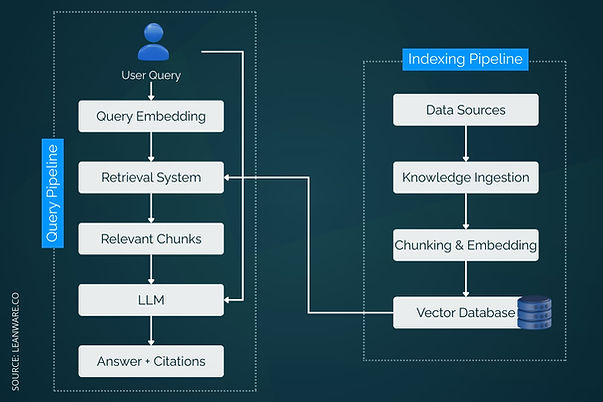
The core components include a knowledge ingestion layer that connects to your data sources, an embedding and indexing system that makes content searchable by meaning rather than just keywords, an LLM that generates responses, and a retrieval system that finds relevant information for each query.
Why They Matter for Modern Organizations
Three problems drive adoption. First, knowledge silos mean information exists but employees can't find it. Sales teams don't know what support teams learned. Engineering documentation lives in repos that product managers never check.
Second, employee turnover creates knowledge loss. When experienced staff leave, institutional knowledge walks out the door. Documentation helps but rarely captures everything.
Third, onboarding takes too long. New hires spend weeks figuring out where information lives and whom to ask. An AI assistant that answers questions instantly accelerates time to productivity.
Key Features of Enterprise Knowledge AI Assistants
At a high level, Enterprise Knowledge AI Assistants gather information from multiple sources, organize it intelligently, enable semantic search, provide personalized insights, and summarize or generate content to make knowledge easier to find and use.
Feature | Purpose |
Gather & Capture | Pulls data from tools like Google Drive, Confluence, Slack, Salesforce |
Organize & Categorize | Auto-tags content, builds taxonomies, detects duplicates |
Semantic Search | Finds info based on meaning, not exact keywords |
Personalized Insights | Surfaces relevant content, highlights gaps |
Summarization & Generation | Summarizes docs and creates new content like FAQs |
1. Knowledge Gathering and Capture
These systems connect to your existing tools and ingest content without requiring manual data entry. Standard integrations include document storage (Google Drive, SharePoint, Dropbox), wikis (Confluence, Notion), communication tools (Slack, Microsoft Teams), helpdesk platforms (Zendesk, Intercom), and CRMs (Salesforce, HubSpot).
The ingestion process handles both structured data (database records, spreadsheets) and unstructured content (documents, emails, chat logs). Connectors sync on schedules or detect changes in real time.
2. Knowledge Organization and Categorization
Raw content needs structure to be searchable. AI assistants use natural language processing to auto-tag content, identify topics, and build taxonomies. This happens automatically as new content arrives.
Good systems also detect duplicates and contradictions. If your knowledge base contains two documents with conflicting policies, the system can flag this for resolution.
3. Semantic Search and Intelligent Retrieval
Keyword search fails when users don't know the exact terms documents use. Semantic search understands meaning. A query for "vacation policy" finds results even if the document says "PTO guidelines."
This works through embeddings, vector representations that capture semantic relationships. Documents with similar meanings cluster together in vector space, enabling retrieval based on conceptual relevance rather than exact word matches.
4. Personalized Recommendations and User Insights
Assistants learn from usage patterns. If engineers frequently search for API documentation, the system surfaces that content more prominently for engineering queries. Role-based personalization ensures employees see information relevant to their function.
Analytics reveal what people search for, what they can't find, and where knowledge gaps exist. This data helps teams prioritize documentation efforts.
5. Automated Content Summarization and Generation
Long documents get summarized for quick consumption. Meeting transcripts become action items. Support tickets get categorized and routed automatically.
Some systems generate new content from existing knowledge, like drafting FAQ entries from resolved support tickets or creating onboarding guides from scattered documentation.
How Enterprise Knowledge AI Assistants Work
These systems combine multiple components to ingest, organize, retrieve, and present knowledge, ensuring users get accurate and context-aware answers.
Underlying Architecture and Data Flow
The typical architecture flows through four stages. First, connectors pull content from source systems. Second, the ingestion pipeline processes documents, chunks them into segments, generates embeddings, and stores everything in a vector database. Third, when a user asks a question, the retrieval system finds relevant chunks. Fourth, the LLM generates an answer using retrieved context.
Feedback loops improve the system over time. Users rate answers, flag errors, and suggest corrections. This data refines retrieval ranking and identifies content that needs updating.
Integration with Enterprise Systems
Integrations extend beyond data ingestion:
- Authentication: Single sign-on (SSO) with existing identity providers.
- Embedding & APIs: Allows the assistant to be integrated into portals or apps.
- Actions: Webhooks trigger automated tasks in connected systems.
Common integration points include Slack or Teams for chat access, internal portals for search, ticketing systems for triage, and CRMs for contextual customer information.
Security, Governance, and Access Control
Enterprise requirements shape how these systems handle data. Role-based access control (RBAC) ensures users only see content they're authorized to access. If an HR document is restricted to managers, the assistant won't surface it for non-managers.
Compliance features include SOC 2 and ISO 27001 certifications, audit logs tracking every query and response, data residency options for regional requirements, and encryption at rest and in transit. For regulated industries, some vendors offer HIPAA and GDPR-compliant configurations.
Benefits of Implementing Enterprise Knowledge AI Assistants
Enterprise Knowledge AI Assistants turn scattered knowledge into an accessible, actionable resource, improving efficiency and collaboration across the organization.
Benefit | Impact |
Knowledge Retention | Preserves tribal knowledge through Q&A interactions. |
Faster Decision-Making | Provides instant answers, reducing search time. |
Productivity | Handles repetitive queries, freeing experts for complex work. |
Collaboration | Centralized knowledge improves cross-team workflows. |
Improved Knowledge Retention
Tribal knowledge, the information that exists only in people's heads, becomes searchable when employees interact with the assistant. Questions and answers create a record. Over time, this captures expertise that would otherwise be lost to turnover.
Faster Problem Solving and Decision Making
Instead of scheduling meetings to find the right person or digging through folders, employees get answers in seconds. Support teams resolve tickets faster. Engineers find documentation without interrupting colleagues.
Knowledge workers spend 30% of their time looking for data across an average of 367 apps and systems in large organizations. Consolidating search into a single interface reduces this significantly.
Enhanced Productivity Through Automation
Repetitive questions drain time from subject matter experts. When the assistant handles common queries, experts focus on complex problems. HR stops answering the same benefits questions. IT reduces tier-1 support tickets.
Better Collaboration Across Teams
Centralized, searchable knowledge makes cross-functional work smoother. Product teams find customer feedback without asking support. Sales accesses competitive intelligence without waiting for marketing. Everyone works from the same information.
Common Challenges and How to Overcome Them
Even with advanced AI assistants, organizations face hurdles that can limit effectiveness.
Challenge | Solution |
Siloed Knowledge | Connect key sources and map content across systems. |
Information Overload | Use governance, reviews, filtering, and archive outdated content. |
Maintaining Quality | Assign owners, enable alerts and flags, use version control. |
Dealing with Fragmented or Siloed Knowledge
Most organizations store information across dozens of systems with no unified index. The solution starts with system connectors that pull from all sources. Regular syncs keep content current. AI mapping tools identify relationships across systems.
Start with the highest-value sources. Connect your wiki and support system first, then expand to other platforms as you validate the approach.
Ensuring Searchability and Reducing Information Overload
More content doesn't mean better answers. Low-quality or outdated documents pollute search results. Implement content governance with ownership roles assigned to each knowledge area, regular review cycles to archive stale content, quality standards for what gets indexed, and filtering options so users narrow results by date, source, or topic.
Maintaining High-Quality, Up-to-Date Knowledge Assets
Knowledge bases decay without maintenance. Assign content owners responsible for specific domains. Set up automated alerts when documents reach a certain age without review. Enable users to flag outdated content directly from search results.
Version control helps track changes and roll back errors. Some systems integrate with documentation workflows to trigger updates when source materials change.
Use Cases and Real-World Examples
These assistants improve efficiency across support, research, onboarding, and content workflows by delivering relevant knowledge quickly and enabling actionable insights.
Customer Support and Technical Resolution
Support teams use knowledge assistants to surface answers during customer interactions. Instead of searching multiple systems, agents query the assistant and get responses with source links.
Confluent deployed an AI knowledge assistant across their 20+ internal tools. Their Technical Support teams reduced investigation time per ticket by 5 to 10 minutes. The company reports saving 15,000+ hours monthly and saw a 13% increase in support team satisfaction with information access.
Media and Editorial Research
Organizations with large content archives use knowledge assistants to make historical information accessible for current work.
TIME magazine indexed over 100 years of historical articles using an AI knowledge platform. Their editorial team now retrieves articles, summaries, and direct links in seconds rather than manually searching scattered digital systems. The implementation took three weeks to go live.
Onboarding and Employee Productivity
New employees use assistants to find policies, procedures, and institutional knowledge without interrupting colleagues.
Super.com reports saving 1,500+ hours per month and onboarding employees 20% faster after deploying a unified knowledge assistant. GCash sees employees saving 2 to 3 hours per week, with over 90% adoption rates in some departments.
Content Creation and Production Workflows
Beyond answering questions, assistants accelerate content production by surfacing relevant context and source material.
Booking.com used an AI knowledge platform to accelerate video script creation for partner promotions. They reduced creation time per video from 8 weeks to 2 weeks while increasing output from 2 to 5 videos per month.
Best Practices for Deployment
Effective deployment relies on understanding team needs, choosing the right tools, and continuously monitoring performance to ensure the assistant delivers real value.
Practice Area | Key Actions |
Stakeholder Requirements | Identify needs per team, interview for pain points and metrics |
Tools & Models | Evaluate integration, security, customization, pricing, vendor options |
Continuous Improvement | Track usage, monitor answer quality, identify gaps, update content |
Mapping Stakeholder Requirements
Different teams need different things. HR wants policy questions answered. Support wants ticket deflection. Engineering wants documentation findable. Map requirements before selecting a solution.
Interview stakeholders about current pain points, existing tools, and success metrics. This prevents deploying a system that solves problems nobody has.
Selecting the Right Tools and Models
Evaluate based on your specific needs. Key factors include integration coverage (does it connect to your tools?), security certifications (does it meet your compliance requirements?), customization options (can you tune retrieval and responses?), and pricing model (per user, per query, or flat rate?).
Vendor options range from horizontal platforms like Glean, Guru, and Korra to vertical solutions built for specific industries. Open-source frameworks like LangChain enable custom builds for teams with engineering resources.
Monitoring and Continuous Improvement
Launch is the beginning, not the end. Track usage analytics to see what people search for, measure answer quality through user ratings, identify gaps where users search but don't find answers, and monitor performance to catch slowdowns or errors.
Regular reviews of query logs reveal documentation gaps. If employees repeatedly ask questions the system can't answer, that content needs to be created or connected.
Future Trends in Knowledge AI Assistants
Looking ahead, these assistants will handle longer context, learn from interactions, and adapt to users and workflows, making them more useful across different tasks.
Advances in Large Language Models
Context windows continue expanding. Larger windows mean assistants can process longer documents and more context per query. Multimodal capabilities will enable searching across images, diagrams, and video content.
Reasoning improvements help assistants handle complex, multi-step questions that require synthesizing information from multiple sources.
Adaptive Learning and Context Awareness
Future systems will adapt more dynamically to individual users and organizational context. They'll learn from corrections without manual retraining and adjust responses based on department, role, and past interactions.
Agentic capabilities will enable assistants to take actions across systems, not just answer questions. An assistant might update documentation when it detects outdated information or escalate unresolved queries to human experts.
Getting Started
Enterprise knowledge AI assistants work best when they solve real problems for real users. Start by identifying where employees waste time searching, which teams would benefit most, and what systems contain the knowledge they need.
The technology has matured enough that implementation is straightforward for most organizations. The harder work is governance: deciding what content to index, who maintains it, and how you measure success.
You can also connect with our experts to explore how Enterprise Knowledge AI Assistants can simplify knowledge management and enhance team productivity.
Frequently Asked Questions
What is an enterprise knowledge AI assistant?
An AI system that helps organizations capture, organize, and retrieve internal knowledge through natural language. It uses large language models and semantic search to discover information across multiple data sources.
How are knowledge AI assistants different from chatbots?
Chatbots follow pre-defined scripts and handle limited tasks. Knowledge AI assistants understand natural language, interpret context, and pull answers from internal systems like wikis, CRMs, and documentation.
What types of data can they access?
Internal wikis (Notion, Confluence), CRMs, file storage (Google Drive, SharePoint), helpdesk tools, emails, and structured databases.
Are enterprise knowledge assistants secure?
Most include encryption, role-based access control, SOC 2/ISO 27001 compliance, and audit trails. Enterprise solutions support SSO and data residency requirements.
Can AI assistants replace internal documentation?
No. They enhance existing documentation by making it searchable. The underlying content still needs human creation and maintenance.
Which industries benefit most?
SaaS, healthcare, legal, financial services, consulting, and customer support. Any sector with high information complexity.
How do I choose the right solution?
Consider your business size, existing tools, security requirements, and integration needs. Start with a pilot in one department before expanding.