E-Learning Software Development Services & Solutions

E-learning platforms handle everything from employee onboarding to university degrees. The technical requirements vary, but the core challenge remains the same: deliver content effectively, track progress accurately, and keep learners engaged.
The e-learning services market reached $299.67 billion in 2024 and is projected to grow at 19% CAGR through 2030, according to Grand View Research. Corporate training drives much of this growth, with custom e-learning accounting for over 29% of the market.
Let's explore the solutions, services, and practical considerations for e-learning software development.
What is E-Learning Software?
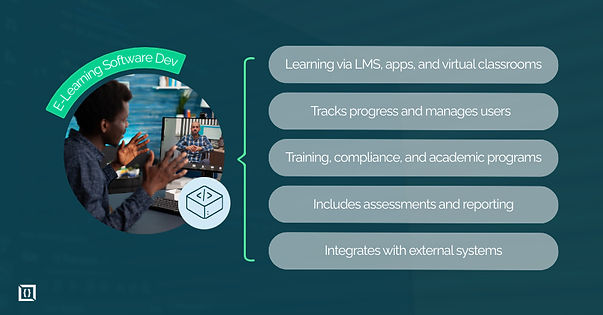
E-learning software delivers educational content through digital platforms. This includes learning management systems (LMS), virtual classrooms, mobile learning apps, microlearning tools, and assessment platforms.
The scope varies widely. A simple compliance training module differs from a full university degree program. But the core technical requirements overlap: content delivery, user management, progress tracking, and reporting.
Common use cases include:
- Employee training: Onboarding, compliance, skill development, leadership programs.
- Corporate compliance: Regulatory requirements with audit trails and certification tracking.
- Academic programs: Degree programs, certifications, MOOCs, continuing education.
- Customer education: Product training, certification programs, partner enablement.
The technical stack typically involves content management, user authentication, progress tracking, assessment engines, reporting dashboards, and integrations with external systems.
Benefits of Custom E-Learning Software
Off-the-shelf platforms like Moodle or Canvas work for standard use cases. Custom development makes sense when you need:
- Specific integrations: HR systems (Workday, SAP), proprietary databases, existing tools.
- Unique content models: Specialized assessment types, custom workflows, proprietary pedagogies.
- Branding control: White-label solutions for B2B or customer-facing platforms.
- Scalability: Architecture designed for your specific load patterns and growth projections.
- Competitive differentiation: Features your competitors can't access.
Custom platforms avoid per-seat licensing fees that compound as you scale. A platform with 10,000 users paying $5/seat/month costs $600,000 annually. Custom development often pays for itself within 2-3 years at scale.
Key Features of Effective E-Learning Platforms
Features such as progress tracking, mobile access, content authoring, analytics, accessibility, user management, gamification, and assessments form the foundation of effective e-learning platforms, enabling measurable, engaging, and inclusive learning experiences.
Feature | Purpose |
Progress tracking | Monitor completion, time spent, assessment scores |
Mobile compatibility | Access on any device, offline support for low-connectivity |
Content authoring | Create and update courses without developer involvement |
Real-time analytics | Identify struggling learners, measure engagement |
Accessibility | WCAG compliance, screen reader support, captions |
User management | Roles, permissions, organizational hierarchies |
Gamification | Points, badges, leaderboards to drive engagement |
Assessments | Quizzes, assignments, proctored exams |
E-Learning Software Solutions
E-learning platforms bring together course delivery, content management, mobile access, virtual classrooms, AI tools, gamification, and assessments to create learning experiences that are engaging, measurable, and easy to scale.
1. Learning Management Systems (LMS)
An LMS manages the full learning lifecycle: user enrollment, content delivery, progress tracking, and reporting. Core technical requirements include SCORM or xAPI compliance for content interoperability.
Key features:
- Course catalogs and learning paths.
- Certification tracking and compliance reporting.
- Role-based access, organizational hierarchies.
- Automated enrollment and manager approvals.
2. eLearning Portals
Multi-tenant portals serve B2B or B2C audiences. Each organization or customer gets a branded experience with isolated data. Common in software companies offering product training or consulting firms delivering client programs.
Technical considerations: tenant isolation at database or application level, custom branding per tenant (logos, colors, domains), SSO integration with each client's identity provider, and usage-based billing with metering.
3. Mobile Learning (mLearning) Apps
Mobile learners complete courses 45% faster than desktop users. Mobile-first development prioritizes responsive design, offline content access, push notifications for engagement, and optimized video playback.
Development approaches:
- Cross-platform (React Native, Flutter) for faster delivery.
- Native apps for heavy video or complex interactions.
- Offline sync with conflict resolution.
4. Learning Content Management Systems (LCMS)
An LCMS focuses on content creation and management, while an LMS focuses on delivery. LCMS platforms support instructional designers with version control, reusable content objects, collaborative authoring, and workflow approvals.
Organizations with large content libraries, frequent updates, or multiple content authors benefit from LCMS capabilities. Many enterprises combine LCMS for authoring with LMS for delivery.
5. Virtual Classrooms and Live Sessions
Real-time learning features include video conferencing, screen sharing, interactive whiteboards, chat, polls, and breakout rooms. Integration with platforms like Zoom, Microsoft Teams, or custom WebRTC implementations.
Recording and playback extend the value of live sessions for asynchronous learners. Transcription and searchable video enhance accessibility and content discovery.
6. AI-Powered Learning Tools
AI applications in e-learning:
- Adaptive learning: Adjust content difficulty based on performance,
- Recommendations: Suggest relevant courses based on role and history.
- Intelligent tutoring: Answer questions, provide hints.
- Content generation: Assist with quiz creation, summaries.
According to LearnExperts' 2024 Workplace Learning Report, 30% of L&D teams already use AI-powered tools, with 91% planning to increase usage.
7. Gamification and Engagement Features
Game mechanics improve engagement. Gamified training shows completion rates around 90% compared to 25% for non-gamified content.
Features include points, badges, leaderboards, challenges, streaks, and unlockable content. The key is tying mechanics to actual learning objectives.
8. Analytics and Reporting Dashboards
Dashboards provide actionable insights for different users.
Users and metrics:
User | Key Metrics & Purpose |
Learners | Progress, scores, engagement patterns |
Managers | Team completion rates, compliance status |
Administrators | Audit reports, content effectiveness, time-to-competency |
9. Assessment and Proctoring Software
Assessment features range from auto-graded quizzes to live proctored exams. Question types include multiple choice, fill-in-the-blank, matching, drag-and-drop, and open-ended responses with rubric-based grading.
AI-powered proctoring detects suspicious behavior through webcam monitoring, screen recording, and keystroke analysis. Browser lockdown prevents access to external resources during exams.
Skills validation tools go beyond multiple choice, testing practical application through simulations, coding challenges, or project submissions. These provide better signal on actual competency than traditional assessments.
Custom E-Learning Development Services
Custom e-learning development covers the full lifecycle of planning, building, and maintaining a learning platform. From initial discovery to ongoing support, each stage ensures the system meets learning objectives, integrates smoothly, and provides a user-friendly experience.
Stage | What It Covers |
Consulting & Requirements | Learning goals, user roles, integrations, project roadmap |
Design & UX | Learner-focused, responsive, accessible, intuitive |
Platform-Based Implementation | Moodle/Canvas/Totara, custom branding, integrations |
Custom Software Development | Full flexibility, custom stack and features |
AI & Personalization Integrations | Adaptive paths, recommendations, chatbots |
QA & Testing | Functional, accessibility, cross-device, load, role-based |
Maintenance & Support | Updates, bug fixes, performance monitoring |
Migration & Modernization | Legacy to modern systems, data and content migration |
1. Consulting and Requirements Definition
Discovery workshops define learning objectives, user roles, content types, and integration requirements. Stakeholder interviews surface compliance needs, existing system constraints, and success metrics.
Output: detailed requirements document, technical architecture, and project roadmap.
2. Design and UX for Learning Experiences
Learner-centric design prioritizes clarity and reduces cognitive load. Accessibility compliance (WCAG 2.1) ensures all learners can participate.
Mobile-responsive interfaces, intuitive navigation, and progress visualization improve completion rates.
3. Platform-Based Implementation
Platforms like Moodle, Canvas, or Totara accelerate delivery. Customization layers add branding, integrations, and custom features on top of proven foundations.
Best for organizations that need speed and can work within platform constraints.
4. Custom Software Development
For full flexibility, building from scratch is the way to go:
- Tailored architecture, features, and user experience.
- Example tech stack: React/Angular frontend, Node.js/Python backend, PostgreSQL, AWS/Azure hosting.
- Higher cost, but no limitations on functionality or design.
5. AI and Personalization Integrations
Integration of AI engines for content recommendations, adaptive paths, and chatbot support. Options include OpenAI, Google Cloud AI, or custom models.
Implementation ranges from API integrations to custom model training on organizational data.
6. Quality Assurance and Testing
Testing ensures the platform works reliably across all scenarios:
- Functional checks and cross-browser/device testing.
- Accessibility validation and load testing.
- Content-specific checks (video, interactive exercises, assessments).
- Testing for all roles: learners, instructors, admins.
7. Maintenance and Ongoing Support
Even after launch, platforms need care:
- Bug fixes, security updates, and performance monitoring.
- Content updates and feature enhancements.
- Typical annual cost: 15–25% of initial development.
- Keeps the system secure, stable, and evolving with needs.
8. Migration and Modernization Services
Moving from older systems to modern platforms can be complex:
- Migrate legacy LMS like Blackboard to a custom system.
- Shift from on-premise to cloud or monolith to microservices.
- Includes data extraction, content conversion, and smooth user transition.
- Parallel operation periods reduce downtime.
How to Drive Your E-Learning Software to Success
Running an e-learning platform means thinking through how people learn, how they access content, and how progress is tracked. Personalizing learning, managing user roles, and keeping the system organized all help make the platform practical and useful for both learners and administrators.
Personalized Learning Journeys
Personalization improves outcomes. Adaptive systems adjust content difficulty based on performance. Role-based paths deliver training relevant to specific job functions. Skill assessments identify gaps and recommend targeted courses.
Implementation essentials:
- Learner data: roles, history, performance.
- Content metadata: topics, difficulty, prerequisites.
- Matching algorithms to align learners with the right content.
User Management and Authentication
Role-based access controls define what users can see and do. Learners access courses. Instructors manage content. Managers view team progress. Administrators configure the platform.
SSO integration (SAML, OAuth) enables single sign-on with corporate identity providers. Multi-tenancy isolates data between organizations in B2B scenarios.
Compliance features: audit logs tracking all user actions, data retention policies, GDPR consent management, and FERPA compliance for educational records.
Fast Time-to-Market Strategies
Speed doesn’t have to compromise quality:
- MVP approach: Launch with core features, iterate based on feedback.
- Prebuilt components: Use libraries for authentication, video, analytics.
- Agile sprints: 2-week cycles with regular demos for stakeholder alignment.
Turning Mandatory Training into Engaging Learning
Compliance training often suffers from low engagement because it feels like a checkbox exercise. Improvements that work:
- Scenario-based learning: Real situations instead of abstract policies
- Microlearning modules: 5-10 minute segments instead of hour-long courses
- Gamification elements: Progress bars, achievements, friendly competition
- Real-world examples: Case studies from your industry
Interactive content outperforms passive video. Spaced repetition (reviewing content over time) improves long-term retention.
Recruitment and Onboarding Focused Learning Tracks
E-learning can streamline hiring and onboarding:
- Pre-hire assessments: Test skills before offering roles, improving candidate fit.
- Onboarding tracks: Accelerate new hire productivity with role-specific paths.
- HR integration: Automates enrollment based on hire date and role assignment.
- Progress tracking: Managers see how new hires are ramping.
Why Choose a Professional E-Learning Development Company
Building effective e-learning software requires experience, best practices, and industry knowledge. A professional team brings proven processes, deep technical skills, and strategic insight to every project.
1. Competitive Advantage and Custom Solutions
Specialized teams understand learning technology: SCORM/xAPI standards, content authoring workflows, accessibility requirements, and LMS architecture patterns. They've encountered and solved common problems before.
Custom solutions differentiate your training from competitors using the same off-the-shelf platform. Proprietary features, unique user experiences, and deep integrations create competitive moats.
Build-from-scratch capability matters for organizations with unique requirements. Deep integration skills connect learning platforms with existing enterprise systems seamlessly.
2. Industry Experience
Different industries have different requirements:
- Healthcare: HIPAA compliance, clinical competency tracking, CME credits.
- Finance: Audit trails, regulatory training, certification expiration tracking.
- Manufacturing: Multilingual support, safety certifications, equipment-specific training.
- Technology: Technical skill assessments, coding environments, product training.
Experience in your sector reduces learning curve and surfaces requirements you might not anticipate.
3. Dedicated Support and Client Success
Long-term partnerships include ongoing support, proactive monitoring, and strategic guidance. Look for clear SLAs, accessible project managers, and established escalation paths.
Communication quality matters as much as technical skill. Regular updates, transparent progress tracking, and responsive issue resolution define successful partnerships.
Build Your Custom E-Learning Software
E-learning platforms succeed when they align technical decisions with learning objectives. Start by defining your audience, content model, and success metrics. Prioritize features for an MVP, validate with real users, and iterate.
For project scoping, define your content types, target platforms, integration requirements, and compliance needs. These inform architecture decisions and accurate cost estimates.
You can also connect with us to explore solutions and get guidance on building or improving your e-learning platform.
Frequently Asked Questions
How much does custom e-learning software development cost?
Custom e-learning development typically costs $40,000-$250,000+ depending on complexity. Basic LMS: $40K-$80K. Mid-range with mobile apps and integrations: $80K-$150K. Enterprise with AI, custom assessments, and multiple integrations: $150K-$250K+. LATAM teams cost 40-60% less than US-based teams. A discovery phase helps scope accurately.
What tech stack should I use for scalable e-learning platforms?
Recommended stack for 2025: React or Angular (frontend), Node.js or Django (backend), PostgreSQL or MongoDB (database), AWS or Azure (cloud). Use microservices architecture for scalability. Add Redis for caching, Elasticsearch for content search. Video: AWS MediaConvert or Mux. AI integrations via OpenAI or Google Cloud AI APIs.
How much does it cost to maintain an e-learning platform annually?
Annual maintenance runs 15-25% of initial development cost. This covers hosting, bug fixes, security patches, minor enhancements, and support. AI-powered or high-traffic platforms cost more due to compute and API usage. Budget separately for major feature additions.
What happens if my e-learning platform crashes during mandatory compliance training?
Platform crashes during compliance training create audit risks and regulatory exposure. Prevention: high-availability architecture (multi-AZ deployment), auto-scaling infrastructure, load testing before peak periods, and 24/7 monitoring with alerting. Build failover mechanisms and maintain incident response procedures.
How do I calculate ROI for custom e-learning development?
Compare costs (development, maintenance, content creation) against savings (reduced instructor time, eliminated travel, lower material costs) and gains (faster onboarding, higher completion rates, improved compliance). Track KPIs: time-to-competency, training hours saved, compliance rates, and employee retention. Most organizations see positive ROI within 12-18 months.